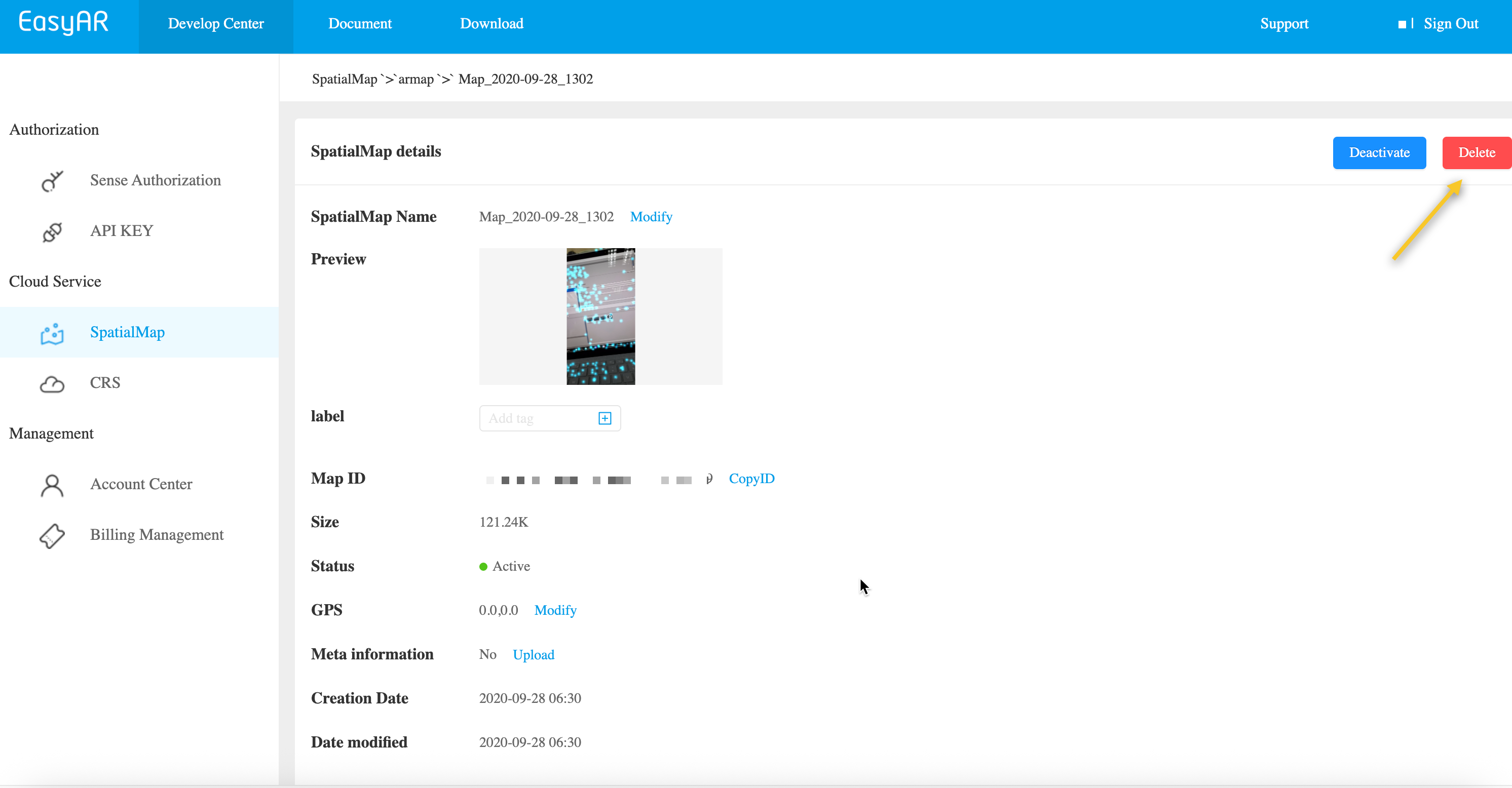
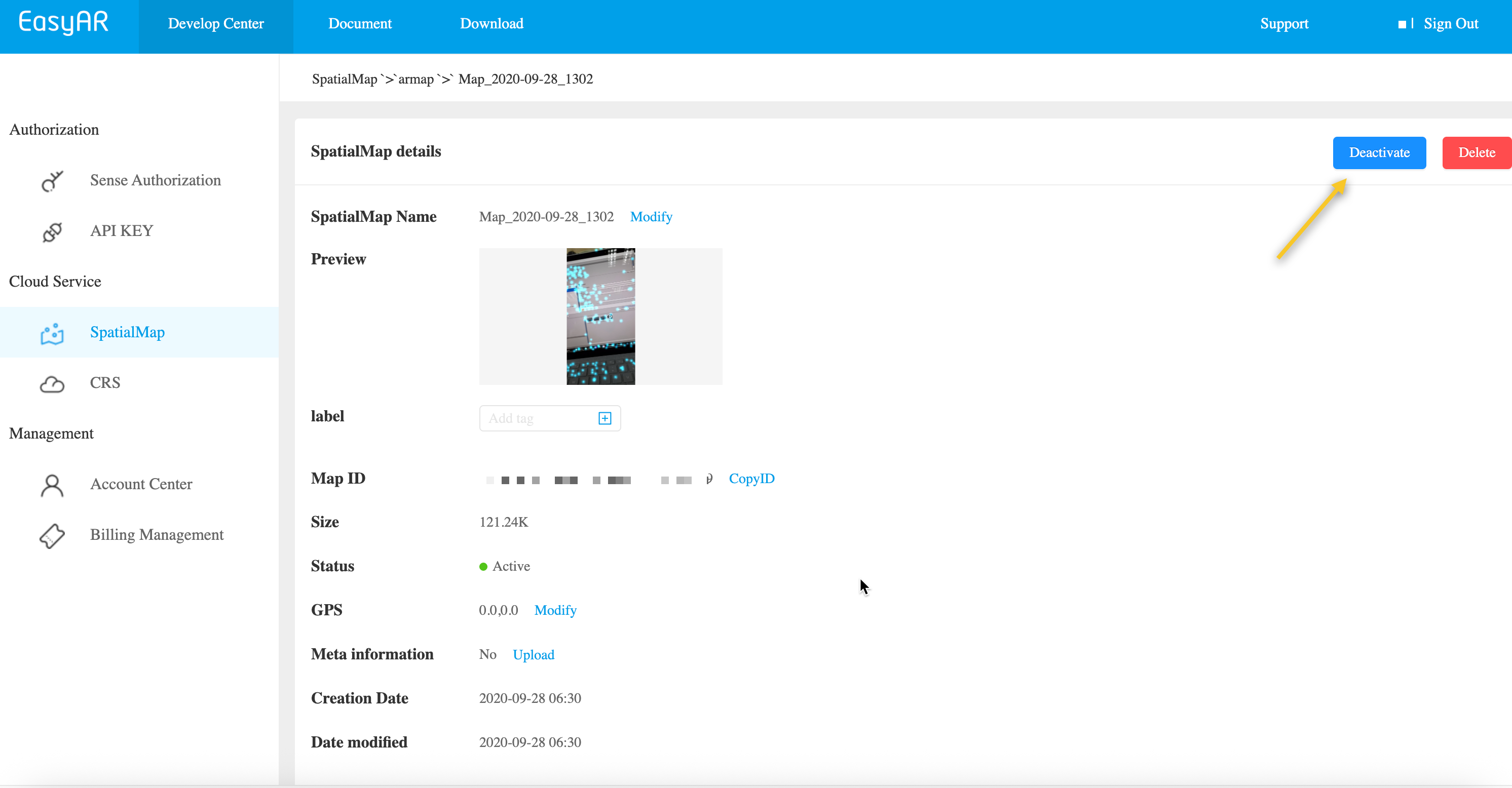
In most business scenarios, if you are not sure whether a map may be needed again in the future, we recommend using Deactivate instead of Delete.
Sparse spatial maps can be automatically cleaned up through the REST API.
Replace the placeholders with actual parameters and run the curl script.
- Your-Cloud-URL -> actual API URLs
- Your-Token -> actual API Key Authorization Token
- Your-SpatialMap-AppId -> your appId
- Your-todo-MapId -> the MapId to delete
curl -X DELETE "https://armap-api-<cn1|na1>.easyar.com/map/<Your-todo-MapId>?appId=<Your-SpatialMap-AppId>" \
  -H "Content-Type: application/json" \
  -H "Authorization: <Your-Token>"
Download the Java sample code
Import the project through Maven
Step 1. Open the code sample RemoveMap.java
Step 2. Modify the global variables and replace them with the authentication parameters in your prepared checklist
- SpatialMap AppId
- API Key / API Secret
- Cloud URL
RemoveMap.java
import okhttp3.*;
import org.json.JSONObject;
import java.io.IOException;
import java.util.Set;

public class RemoveMap {

    private static final String CLOUD_URL       = "https://armap-api-<cn1|na1>.easyar.com";
    private static final String SPATIALMAP_APPID= "--here is your SpatialMap AppId--";
    private static final String API_KEY         = "--here is your API Key--";
    private static final String API_SECRET      = "--here is your API Secret--";
    private static final String MAPID           = "my_mapId";

    public String remove(Auth auth, String mapId) throws IOException {
        okhttp3.Request request = new okhttp3.Request.Builder()
                .url(auth.getCloudURL()+"/map/"+mapId+"?"+ Auth.toParam(
                        Auth.signParam(new JSONObject(), auth.getAppId(), auth.getApiKey(), auth.getApiSecret())
                ))
                .delete()
                .build();
        return new OkHttpClient.Builder().build().newCall(request).execute().body().string();
    }

    public static void main(String[] args) throws IOException{
        Auth accessInfo  =  new Auth(SPATIALMAP_APPID, API_KEY, API_SECRET, CLOUD_URL);
        System.out.println(new RemoveMap().remove(accessInfo, MAPID));
    }
}
Step 3. Run Main
Step 1. Copy the sample code to removemap.php
- Modify the authentication parameters to your actual resources: Token, appId, and Cloud URL
- The MapId of the map to delete
<?php
class MapDeleteService {
    private $baseURL;
    private $token;
    private $appId;

    public function __construct($baseURL, $token, $appId) {
        $this->baseURL = $baseURL;
        $this->token = $token;
        $this->appId = $appId;
    }

    public function deleteMap($mapId) {
        // 构建查询参数
        $queryParams = [
            'appId' => $this->appId
        ];

        $queryString = http_build_query($queryParams);
        $url = $this->baseURL . '/map/' . urlencode($mapId) . '?' . $queryString;

        $ch = curl_init();
        curl_setopt_array($ch, [
            CURLOPT_URL => $url,
            CURLOPT_CUSTOMREQUEST => 'DELETE',
            CURLOPT_RETURNTRANSFER => true,
            CURLOPT_HTTPHEADER => [
                'Authorization: ' . $this->token,
                'Content-Type: application/json'
            ],
            CURLOPT_SSL_VERIFYPEER => false,
            CURLOPT_TIMEOUT => 30
        ]);

        echo "=== API Request ===" . PHP_EOL;
        echo "URL: " . $url . PHP_EOL;
        echo "Method: DELETE" . PHP_EOL;
        echo "Headers: Authorization: " . $this->token . PHP_EOL;
        echo "Query Params: " . json_encode($queryParams, JSON_PRETTY_PRINT) . PHP_EOL;

        $response = curl_exec($ch);
        $httpCode = curl_getinfo($ch, CURLINFO_HTTP_CODE);
        $error = curl_error($ch);

        curl_close($ch);

        echo "=== API Response ===" . PHP_EOL;
        echo "Status Code: " . $httpCode . PHP_EOL;
        echo "Timestamp: " . date('c') . PHP_EOL;

        if ($error) {
            echo "cURL Error: " . $error . PHP_EOL;
            return null;
        }

        $responseData = json_decode($response, true);
        echo "Response Data: " . json_encode($responseData, JSON_PRETTY_PRINT) . PHP_EOL;

        return $responseData;
    }
}


$mapId = 'your_map_id_here';
$config = [
    'baseURL' => 'https://armap-api-cn1.easyar.com',
    'token' => 'your_token_here',
    'appId' => 'your_app_id_here'
];

$mapDeleteService = new MapDeleteService($config['baseURL'], $config['token'], $config['appId']);

$result = $mapDeleteService->deleteMap($mapId);

if ($result) {
    echo PHP_EOL . "=== 删除请求成功 ===" . PHP_EOL;
    if (isset($result['statusCode']) && $result['statusCode'] == 200) {
        echo "Result: " . json_encode($result['result'], JSON_PRETTY_PRINT) . PHP_EOL;
    }
} else {
    echo PHP_EOL . "=== Failed ===" . PHP_EOL;
}
?>
Step 2. Run
php removemap.php
Create the related code file main.go, modify the global variables, and then run
go run main.go
main.go:
package main
import (
"crypto/sha256"
"fmt"
"io"
"net/http"
"sort"
"strconv"
"time"
)
var (
ApiKey = "YOUR_API_KEY"
ApiSecret = "YOUR_API_SECRET"
AppId = "YOUR_APP_ID"
Host = "https://armap-api-<cn1|na1>.easyar.com"
MapId = "YOUR_MAP_ID"
)
func main() {
ts := strconv.FormatInt(time.Now().UnixNano()/1e6, 10)
params := map[string]string{
"apiKey": ApiKey,
"appId": AppId,
"timestamp": ts,
}
keys := []string{"apiKey", "appId", "timestamp"}
sort.Strings(keys)
builder := ""
for _, k := range keys { builder += k + params[k] }
builder += ApiSecret
signature := fmt.Sprintf("%x", sha256.Sum256([]byte(builder)))
url := fmt.Sprintf("%s/map/%s?apiKey=%s&appId=%s×tamp=%s&signature=%s",
Host, MapId, ApiKey, AppId, ts, signature)
req, _ := http.NewRequest("DELETE", url, nil)
resp, _ := http.DefaultClient.Do(req)
defer resp.Body.Close()
body, _ := io.ReadAll(resp.Body)
fmt.Printf("Response: %s\n", string(body))
}
Add the reqwest, tokio, sha2, and hex dependencies to Cargo.toml.
Run cargo run.
use sha2::{Sha256, Digest};
use std::collections::BTreeMap;
use std::time::{SystemTime, UNIX_EPOCH};
const API_KEY: &str = "YOUR_API_KEY";
const API_SECRET: &str = "YOUR_API_SECRET";
const APP_ID: &str = "YOUR_APP_ID";
const HOST: &str = "https://armap-api-<cn1|na1>.easyar.com";
const MAP_ID: &str = "YOUR_MAP_ID";
#[tokio::main]
async fn main() -> Result<(), Box<dyn std::error::Error>> {
let ts = SystemTime::now().duration_since(UNIX_EPOCH)?.as_millis().to_string();
// 1. Signature components
let mut params = BTreeMap::new();
params.insert("apiKey", API_KEY);
params.insert("appId", APP_ID);
params.insert("timestamp", &ts);
// 2. Concatenate keys and values, then append secret
let mut sign_str = String::new();
for (k, v) in ¶ms {
sign_str.push_str(k);
sign_str.push_str(v);
}
sign_str.push_str(API_SECRET);
let mut hasher = Sha256::new();
hasher.update(sign_str.as_bytes());
let signature = hex::encode(hasher.finalize());
// 3. Construct URL and send DELETE
let url = format!("{}/map/{}?apiKey={}&appId={}×tamp={}&signature={}",
HOST, MAP_ID, API_KEY, APP_ID, ts, signature);
let res = reqwest::Client::new().delete(url).send().await?;
println!("Response: {}", res.text().await?);
Ok(())
}
Create a .NET console project.
dotnet new console
dotnet run
using System;
using System.Collections.Generic;
using System.Linq;
using System.Security.Cryptography;
using System.Text;
using System.Net.Http;

class Program {
    static string API_KEY = "YOUR_API_KEY";
    static string API_SECRET = "YOUR_API_SECRET";
    static string APP_ID = "YOUR_APP_ID";
    static string HOST = "https://armap-api-<cn1|na1>.easyar.com";
    static string MAP_ID = "YOUR_MAP_ID";

    static async System.Threading.Tasks.Task Main() {
        string timestamp = DateTimeOffset.Now.ToUnixTimeMilliseconds().ToString();

        // 1. Sort parameters
        var dict = new SortedDictionary<string, string> {
            { "apiKey", API_KEY },
            { "appId", APP_ID },
            { "timestamp", timestamp }
        };

        // 2. Concatenate and append Secret
        StringBuilder sb = new StringBuilder();
        foreach (var kv in dict) sb.Append(kv.Key).Append(kv.Value);
        sb.Append(API_SECRET);

        string signature = Sha256(sb.ToString());

        // 3. Execute DELETE request
        using var client = new HttpClient();
        string query = string.Join("&", dict.Select(x => $"{x.Key}={x.Value}")) + $"&signature={signature}";
        string url = $"{HOST}/map/{MAP_ID}?{query}";

        var response = await client.DeleteAsync(url);
        Console.WriteLine($"Result: {await response.Content.ReadAsStringAsync()}");
    }

    static string Sha256(string str) {
        byte[] bytes = SHA256.HashData(Encoding.UTF8.GetBytes(str));
        return BitConverter.ToString(bytes).Replace("-", "").ToLower();
    }
}
- Runtime environment
- Unity 2020 LTS or later
- Scripting Backend: Mono or IL2CPP are both supported
- API Compatibility Level: .NET Standard 2.1 (recommended)
Step 1: Prepare the image file
- Create a directory in the Unity project:
Assets/
└── Scripts/
     └── DeleteMap.cs
using System.Collections;
using UnityEngine;
using UnityEngine.Networking;

public class DeleteMap : MonoBehaviour
{
    [Header("Config")]
    public string mapId = "Your mapId";
    public string apiBaseUrl = "https://armap-api-<cn1|na1>.easyar.com";
    public string authorizationToken = "YOUR API KEY AUTH TOKEN";
    public string spatialMapAppId = "Your Spatial Map appId";

    private void Start()
    {
        StartCoroutine(DeleteAMap());
    }

    private IEnumerator DeleteAMap()
    {

        string url =
            $"{apiBaseUrl}/map/{mapId}?appId={spatialMapAppId}";

        UnityWebRequest request = UnityWebRequest.Delete(url);
        request.downloadHandler = new DownloadHandlerBuffer();

        request.SetRequestHeader("Content-Type", "application/json");
        request.SetRequestHeader("Authorization", authorizationToken);

        yield return request.SendWebRequest();

        if (request.result == UnityWebRequest.Result.Success)
        {
            Debug.Log("Delete map success:");
            Debug.Log(request.downloadHandler.text);
        }
        else
        {
            Debug.LogError("Delete map failed:");
            Debug.LogError(request.error);
            Debug.LogError(request.downloadHandler.text);
        }
    }
}
Step 3: Configure parameters (Inspector)
Modify the following in the Inspector panel:
- Api Url
- Authorization Token
- Spatial Map App Id
- Map Id: mapId of the map to delete
Modify only these items to run, and fill in the parameters prepared in the preparation checklist
Step 4: Run
- Click Play
- View the result in Console:
- Success: returns JSON (including result)
- Failure: HTTP / error information