EasyAR Sense Unity Plugin Migration Guide
This article introduces how to migrate from the old version of the EasyAR Sense Unity Plugin to the new version.
Compatibility Description
Starting from version 4000, the EasyAR Sense Unity Plugin follows the Package Versioning (using Semantic Versioning) required by Unity. Compatibility can be determined based on the version number.
4.7 is a gradually updated version, and any two 4.7 versions are not compatible.
For versions before 4.7, only the third version number indicates backward compatibility, and changes in the first two version numbers indicate incompatibility. For example, 4.6.2 is compatible with 4.6.1, but 4.6.0 is not compatible with 4.5.0.
Warning
Modifying the tgz file or not fully updating the entire plugin after decompression will result in incompatibility.
General Migration Guide
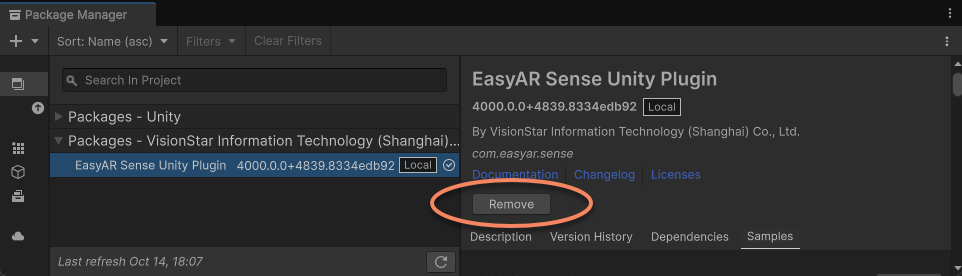
To migrate to the new version, you need to first use the Package Manager window to delete the old - version plugin package and add the new one.
It is recommended to follow these steps:
- Close the running Unity instance.
- Delete the platform compilation directory generated when Unity packs the application.
- Re - open the Unity project and remove the old - version EasyAR Sense Unity Plugin from the project.
- Import the new version of the EasyAR Sense Unity Plugin.
Note
The example files provided by the plugin are not guaranteed to be compatible between versions. After upgrading the plugin, the examples imported into the project may not work properly. It is recommended to delete the old - version examples before operating.
EasyAR contains native library files. If a library function has been executed before deletion or replacement (it will also be called during packaging), these library files will be locked by the system and cannot be deleted or replaced.
Important
Before deleting the old version, make sure that no scene is running in the editor and no application for any platform is being packaged. Generally, it is recommended to close Unity before deleting or replacing the package and replace it immediately after reopening.
Before repackaging with the new - version plugin, you need to first delete the platform compilation directory generated by Unity packaging, including the Gradle project directory generated when packaging for Android and the Xcode directory generated when packaging for iOS.
Tip
Usually, these directories may be in the Library folder of the Unity project (such as Library/Bee/Android/Prj/IL2CPP/Gradle), but different Unity versions may vary.
If you have packaged but cannot find the directory for the corresponding platform, it is recommended to delete the entire Library folder.
If the SchemaHashNotMatched exception occurs after migration, there are usually two possibilities:
- The aforementioned operations were not performed correctly, resulting in a failed or incomplete upgrade, or the compilation directory generated by Unity was not updated correctly (Note: If you do not delete it manually, there is a high probability of an error). It is recommended to follow the recommended steps or re - compile using a project without the
Librarycache. - You manually modified the EasyAR tgz file or did not fully update the entire plugin after decompression. In this case, EasyAR cannot guarantee its availability, and you need to re - download the correct package and import it.
Important
Since the library files of EasyAR Sense and the locations of the packaged library files may change, if you keep the Gradle or Xcode project generated by Unity, you must delete all files related to EasyAR in advance, such as EasyAR.aar, libEasyAR.so, easyar.framework, etc.
Migrate to Version 4003
Tip
There are only incompatible changes when using Mega, and the use of other functions is not affected.
When migrating from version 4002 to 4003, in addition to the above general migration guide, you also need to pay attention to the following content.
Mega Development Process Changes
In version 4003, there have been significant changes to the development process of Mega. If you have previously used other features of the EasyAR Sense Unity Plugin, you will be quite familiar with this process.
The main changes include the following:
- Functional changes to the
com.easyar.megapackage- You can use Mega without importing this package; however, when you need to load block models in the editor to assist with content placement, you still need to import it.
- Added the Mega Block/Landmark support configuration option: It needs to be enabled before packaging.
- Editor function changes
- Loading block mesh and other data no longer requires the Mega Studio tool. Even if a labeling tool is added to the scene, it cannot be used for Unity development.
- The MegaBlockController component panel directly provides the editor functions for blocks, making management more straightforward.
- The session verification tool provides more practical Mega control options, replacing the functions in the original Mega Studio and the editor test area functions of the MegaTrackerFrameFilter.
- Target behavior changes
- EasyAR.Mega.Scene.BlockController has been replaced by MegaBlockController. MegaBlockController is a subclass of TargetController and follows the standard target behavior pattern and the active control strategy applicable to targets.
- EasyAR.Mega.Scene.BlockRootController has been deleted. Blocks no longer have a root node, and each block is independent.
- MegaBlockController can be created by ARSessionFactory.CreateController. When migrating from 4002 to 4003, the key is to reorganize the block objects in the scene and replace the node groups originally generated by Mega Studio with the MegaBlockController component:
- Delete the node groups originally generated by Mega Studio in the scene, including the
MegaBlocksobject and all block objects under it.
- If there are labeling nodes, they also need to be deleted.
- If there are content objects under the block objects, it is recommended to move the content objects to other nodes first, noting to keep the local transform unchanged.
- Add a Mega tracking target to the scene.
- If there are multiple block objects in the original scene, you need to create multiple Mega tracking targets in the scene.
- Move the content objects under the original block objects to the newly created Mega tracking targets, noting to keep the local transform unchanged.
- Pay attention to configuring the id of MegaBlockController.Source. This id needs to be consistent with the id of the original block object to ensure correct loading at runtime.
- Pay attention to configuring MegaBlockController.Tracker to use the correct MegaTrackerFrameFilter.
- If there are labeling nodes in the original scene, you need to create nodes similar to 3D objects to replace the labeling nodes.
- If there is logic in the script to create blocks in the original project, you need to use the method in Add a Mega tracking target to replace it.
- Delete the invalid scripts on the child node
Mega Tracker(MegaTrackerFrameFilter) ofAR Session (EasyAR). For most usage scenarios, after replacing the block nodes, other content in the scene can run normally without modification.
Interface Changes
| Function Module | v4002 API | v4003 API | Usage Instructions |
|---|---|---|---|
| Mega | MegaTrackerFrameFilter.BlockHolder | MegaBlockController.Tracker | Add Mega Tracking Targets Configure the loader at the block node instead of configuring the loaded block root node at the tracker node. |
| Mega | MegaTrackerFrameFilter.SwitchEndPoint(ExplicitAddressAccessData, BlockRootController) | MegaTrackerFrameFilter.SwitchEndPoint | Control the Mega Tracking Process |
| Mega | MegaTrackerFrameFilter.SimulatorLocation | MegaTrackerFrameFilter.SimulatorLocation | |
| Mega | CloudLocalizerFrameFilter.BlockHolder | MegaBlockController.Tracker | Add Mega Tracking Targets Configure the loader at the block node instead of configuring the loaded block root node at the tracker node. |
| Mega | CloudLocalizerFrameFilter.SwitchEndPoint(ExplicitAddressAccessData, BlockRootController) | CloudLocalizerFrameFilter.SwitchEndPoint | Control the Mega Tracking Process |
| Mega | CloudLocalizerFrameFilter.SimulatorLocation | CloudLocalizerFrameFilter.SimulatorLocation | |
| Mega | MegaLocalizationResponse.Blocks | MegaLocalizationResponse.Blocks | Control the Mega Tracking Process |
| Mega Support | EasyAR.Mega.Scene.BlockHolder | - | The function has been deleted. |
| Mega Support | EasyAR.Mega.Scene.BlockHolder.MultiBlock | - | The function has been deleted. |
| Mega Support | EasyAR.Mega.Scene.BlockHolder.BlockRoot | MegaBlockController.Tracker | Add Mega Tracking Targets Configure the loader at the block node instead of configuring the loaded block root node at the tracker node. |
| Mega Support | EasyAR.Mega.Scene.BlockHolder.BlockRootSourceType | - | The function has been deleted. |
| Mega Support | EasyAR.Mega.Scene.BlockHolder.MultiBlockStrategy | - | The function has been deleted. |
| Mega Support | EasyAR.Mega.Scene.BlockActiveController | ActiveController | Active Control Strategy for Targets |
| Mega Support | EasyAR.Mega.Scene.BlockController | MegaBlockController | Add Mega Tracking Targets |
| Mega Support | EasyAR.Mega.Scene.BlockRootController | - | The function has been deleted. |
| Mega Support | EasyAR.Mega.Scene.LocalTransform | LocalTransform | |
| Mega Support | EasyAR.Mega.Scene.Location | Location | |
| Mega Support | EasyAR.Mega.Scene.LocationConverter | - | The function has been deleted. |
| Mega Support | EasyAR.Mega.Scene.AnnotationNode | - | The function has been deleted. |
| Mega Support | EasyAR.Mega.Scene.AnnotationGroup | - | The function has been deleted. |
| Mega Support | EasyAR.Mega.Scene.NavPointGraph | - | The function has been deleted. |
Migration to Version 4002
When migrating from version 4001 to 4002, in addition to the general migration guidelines mentioned above, the following points need to be noted.
Interface Changes
| Function Module | v4001 API | v4002 API | Usage Instructions |
|---|---|---|---|
| Auxiliary Function | Image.Image(Buffer, PixelFormat, int, int) | Image.create |
Migrate to Version 4001
Tip
There are only incompatible changes when using Mega, and the use of other functions is not affected.
When migrating from version 4000 to 4001, in addition to the above general migration guide, the following points need to be noted.
Interface Changes
| Function Module | v4000 API | v4001 API | Usage Instructions |
|---|---|---|---|
| Mega | MegaTrackerFrameFilter.ResultPoseType.EnableLocalization | MegaTrackerFrameFilter.EnableLocalization | Control the Mega tracking process |
| Mega | MegaTrackerFrameFilter.ResultPoseType.EnableStabilization | - | The function has been deleted |
Historical Version Migration
When migrating from versions prior to 4000, refer to the following: