EasyAR Sense Unity Plugin 移行ガイド
この記事では、古いバージョンの EasyAR Sense Unity Plugin から新しいバージョンへ移行する方法を説明します。
互換性の説明
4000 以降、EasyAR Sense Unity Plugin は Unity が要求する パッケージバージョン管理 (Semantic Versioning) に従うため、互換性はバージョン番号で判断できます。
4.7 は段階的更新バージョンであり、任意の 2 つの 4.7 バージョンは互換性がありません。
4.7 より前のバージョンでは、第 3 のバージョン番号のみが後方互換性を示し、最初の 2 つのバージョン番号の変更は互換性なしを意味します。たとえば、4.6.2 は 4.6.1 と互換ですが、4.6.0 は 4.5.0 と互換ではありません。
警告
tgz ファイルを変更したり、展開後に plugin 全体を完全に更新しないと、互換性がなくなります。
一般的な移行ガイド
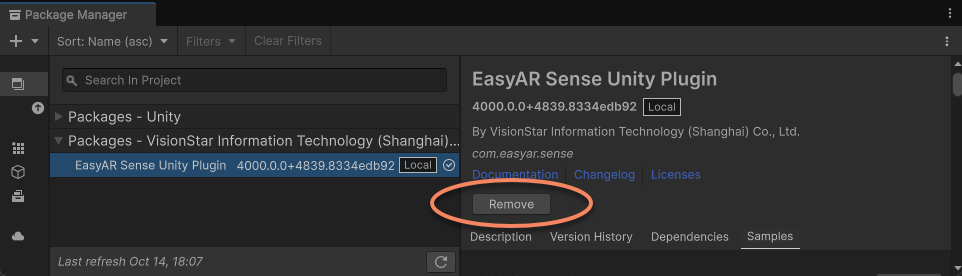
新しいバージョンへ移行するには、まず Package Manager window で古い plugin package を削除し、新しい package を追加します。
次の手順をおすすめします。
- 使用中の Unity を閉じます。
- Unity がアプリを build する際に生成した platform build directory を削除します。
- Unity project を再度開き、古い EasyAR Sense Unity Plugin を project から削除します。
- 新しい EasyAR Sense Unity Plugin をインポートします。
注記
plugin が提供するサンプルファイルは、バージョン間の互換性を保証しません。plugin を更新した後、project に import 済みの sample が正常に動作しないことがあります。古い sample を削除してから進めることをおすすめします。
EasyAR には native library files が含まれています。削除または置換する前にこれらの files が使用されていた場合、system により lock され、削除や置換ができなくなります。
重要
古いバージョンを削除する前に、editor で scene を実行していないこと、また platform application を build していないことを確認してください。通常は、package を削除または置換する前に Unity を閉じ、再度開いた直後に置換することをおすすめします。
新しいバージョンの plugin で再度 build する前に、Unity が生成した platform build directory を先に削除してください。Android の Gradle directory と iOS の Xcode directory を含みます。
ヒント
これらの directory は通常 Unity project の Library フォルダー内にあります。たとえば Library/Bee/Android/Prj/IL2CPP/Gradle などですが、Unity のバージョンによって異なる場合があります。
すでに build したものの対応する platform directory が見つからない場合は、Library フォルダー全体を削除することをおすすめします。
移行後に SchemaHashNotMatched exception が出る場合、通常は 2 つの可能性があります。
- 前述の操作が正しく行われず、更新が失敗または不完全であるか、Unity が生成した build directory が正しく更新されていません。手動で削除しないと高い確率で error になります。推奨手順に従うか、
Librarycache のない project で再 build することをおすすめします。 - EasyAR の tgz file を手動で変更したか、展開後に plugin 全体を完全に更新していません。この場合、EasyAR は動作を保証できないため、正しい package を再ダウンロードして import する必要があります。
重要
EasyAR Sense の library files と build 後の配置場所は変更される可能性があるため、Unity が生成した Gradle または Xcode project を保持する場合は、EasyAR.aar、libEasyAR.so、easyar.framework など EasyAR 関連 files をすべて事前に削除してください。
バージョン 4003 への移行
ヒント
互換性のない変更があるのは Mega を使う場合のみで、他の機能の使用には影響しません。
4002 から 4003 へ移行する際は、上記の一般的な移行ガイドに加えて、以下にも注意してください。
Mega 開発フローの変更
4003 では Mega の開発フローが大きく変わりました。以前に EasyAR Sense Unity Plugin の他機能を使っていたなら、このフローはより馴染みやすいでしょう。
主な変更点は次のとおりです。
com.easyar.megapackage の機能変更- Mega を使うだけならこの package を必ず import する必要はなくなりました。ただし、editor で block model を読み込んで content 配置を補助する場合は、引き続き import が必要です。
- Mega Block/Landmark support の設定項目が追加されました: build 前に有効化。
- editor 機能の変更
- block mesh やその他の data の読み込みに Mega Studio tool は不要になり、scene に annotation tool を追加しても Unity development には使用できません。
- MegaBlockController component panel が block の editor 機能を直接提供し、管理がより直接的になりました。
- session verification tool がより多くの便利な Mega control options を提供し、従来の Mega Studio の機能と MegaTrackerFrameFilter の editor testing area を置き換えます。
- target の挙動変更
- EasyAR.Mega.Scene.BlockController は MegaBlockController に置き換えられました。MegaBlockController は TargetController のサブクラスで、標準の target behavior mode および target に適用される active control strategy に従います。
- EasyAR.Mega.Scene.BlockRootController は削除され、block に root node はなくなり、各 block は独立しました。
- MegaBlockController は ARSessionFactory.CreateController から作成できます。
4002 から 4003 へ移行するときは、scene 内の block object を再構成し、従来 Mega Studio が生成していた node group を MegaBlockController component に置き換えることが最重要です。
- scene 内の従来の Mega Studio が生成した node group を削除します。
MegaBlocksobject とその下のすべての block object を含みます。- annotation node がある場合は、それも削除する必要があります。
- block object の下に content object がある場合は、先に content object を他の node に移し、local transform を変えない ようにします。
- scene に Mega target tracking を追加 します。
- 元の scene に複数の block object がある場合は、複数の Mega target tracking object を作成する必要があります。
- 以前 block object の下にあった content object を新しく作成した Mega target tracking object の下へ移し、local transform を変えない ようにします。
- MegaBlockController.Source の id 設定に注意してください。この id は元の block object の id と一致している必要があります。
- 正しい MegaTrackerFrameFilter を使うよう MegaBlockController.Tracker の設定に注意してください。
- 元の scene に annotation node がある場合は、それに似た node を手動で作成して置き換える必要があります。
- 元の project に script で block を作成するロジックがある場合は、Mega target tracking を追加 の方法で置き換えます。
AR Session (EasyAR)配下の子 nodeMega Tracker(MegaTrackerFrameFilter) にある無効な script を削除します。
ほとんどの場合、block node を置き換えた後は scene の他の content を変更しなくても正常に動作します。
API の変更
| 機能モジュール | v4002 API | v4003 API | 説明 |
|---|---|---|---|
| Mega | MegaTrackerFrameFilter.BlockHolder | MegaBlockController.Tracker | Mega target tracking を追加 block node では、tracker node に設定していた block root の代わりに loader を設定します。 |
| Mega | MegaTrackerFrameFilter.SwitchEndPoint(ExplicitAddressAccessData, BlockRootController) | MegaTrackerFrameFilter.SwitchEndPoint | Mega tracking process を制御 |
| Mega | MegaTrackerFrameFilter.SimulatorLocation | MegaTrackerFrameFilter.SimulatorLocation | |
| Mega | CloudLocalizerFrameFilter.BlockHolder | MegaBlockController.Tracker | Mega target tracking を追加 block node では、tracker node に設定していた block root の代わりに loader を設定します。 |
| Mega | CloudLocalizerFrameFilter.SwitchEndPoint(ExplicitAddressAccessData, BlockRootController) | CloudLocalizerFrameFilter.SwitchEndPoint | Mega tracking process を制御 |
| Mega | CloudLocalizerFrameFilter.SimulatorLocation | CloudLocalizerFrameFilter.SimulatorLocation | |
| Mega | MegaLocalizationResponse.Blocks | MegaLocalizationResponse.Blocks | Mega tracking process を制御 |
| Mega Support | EasyAR.Mega.Scene.BlockHolder | - | 機能削除 |
| Mega Support | EasyAR.Mega.Scene.BlockHolder.MultiBlock | - | 機能削除 |
| Mega Support | EasyAR.Mega.Scene.BlockHolder.BlockRoot | MegaBlockController.Tracker | Mega target tracking を追加 block node では、tracker node に設定していた block root の代わりに loader を設定します。 |
| Mega Support | EasyAR.Mega.Scene.BlockHolder.BlockRootSourceType | - | 機能削除 |
| Mega Support | EasyAR.Mega.Scene.BlockHolder.MultiBlockStrategy | - | 機能削除 |
| Mega Support | EasyAR.Mega.Scene.BlockActiveController | ActiveController | target に適用される active control strategy |
| Mega Support | EasyAR.Mega.Scene.BlockController | MegaBlockController | Mega target tracking を追加 |
| Mega Support | EasyAR.Mega.Scene.BlockRootController | - | 機能削除 |
| Mega Support | EasyAR.Mega.Scene.LocalTransform | LocalTransform | |
| Mega Support | EasyAR.Mega.Scene.Location | Location | |
| Mega Support | EasyAR.Mega.Scene.LocationConverter | - | 機能削除 |
| Mega Support | EasyAR.Mega.Scene.AnnotationNode | - | 機能削除 |
| Mega Support | EasyAR.Mega.Scene.AnnotationGroup | - | 機能削除 |
| Mega Support | EasyAR.Mega.Scene.NavPointGraph | - | 機能削除 |
バージョン 4002 への移行
4001 から 4002 へ移行する際は、上記の一般的な移行ガイドに加えて、以下にも注意してください。
API の変更
| 機能モジュール | v4001 API | v4002 API | 説明 |
|---|---|---|---|
| 補助機能 | Image.Image(Buffer, PixelFormat, int, int) | Image.create |
バージョン 4001 への移行
ヒント
互換性のない変更があるのは Mega を使う場合のみで、他の機能の使用には影響しません。
4000 から 4001 へ移行する際は、上記の一般的な移行ガイドに加えて、以下にも注意してください。
API の変更
| 機能モジュール | v4000 API | v4001 API | 説明 |
|---|---|---|---|
| Mega | MegaTrackerFrameFilter.ResultPoseType.EnableLocalization | MegaTrackerFrameFilter.EnableLocalization | Mega tracking process を制御 |
| Mega | MegaTrackerFrameFilter.ResultPoseType.EnableStabilization | - | 機能削除 |
履歴バージョンの移行
4000 より前のバージョンから移行する場合は、次を参照してください。