iOS/macOS/visionOS에서의 크래시 분석
native(iOS/macOS), Unity(iOS/macOS/visionOS), Unity editor(macOS)에서 발생하는 크래시는 다음 설명을 참고하십시오.
개발 중 크래시 위치 얻기
XCode에서 디버깅할 때 필요한 정보는 아래 그림과 같습니다.
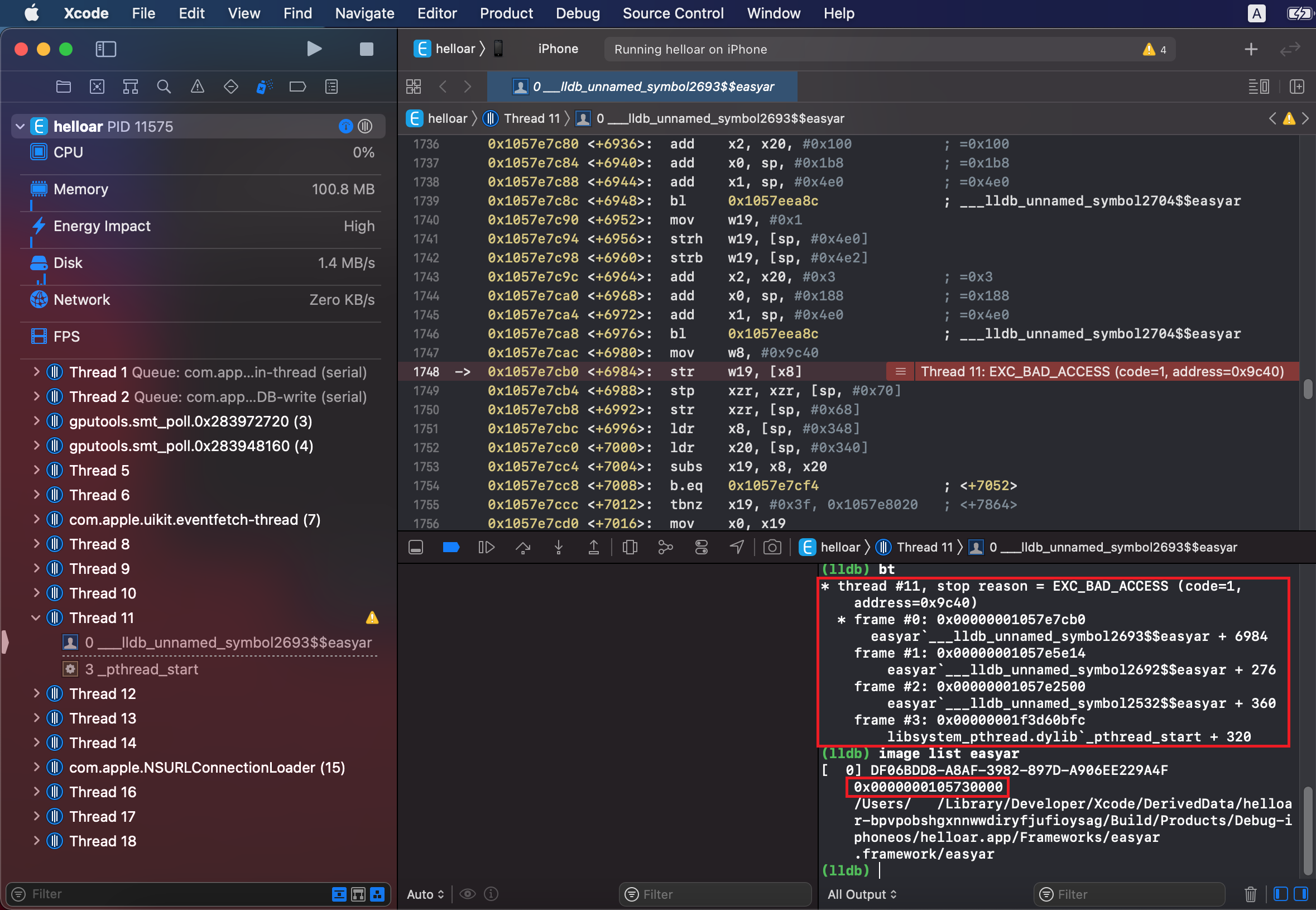
lldb에서 bt를 입력하면 아래와 같이 크래시 원인과 코드 실행 stack을 얻을 수 있습니다.
(lldb) bt
* thread #11, stop reason = EXC_BAD_ACCESS (code=1, address=0x9c40)
* frame #0: 0x00000001057e7cb0 easyar`___lldb_unnamed_symbol2693$$easyar + 6984
    frame #1: 0x00000001057e5e14 easyar`___lldb_unnamed_symbol2692$$easyar + 276
    frame #2: 0x00000001057e2500 easyar`___lldb_unnamed_symbol2532$$easyar + 360
    frame #3: 0x00000001f3d60bfc libsystem_pthread.dylib`_pthread_start + 320
코드 실행 stack에 easyar 또는 libEasyAR.dylib 관련 내용이 있으면 크래시가 EasyAR와 관련될 수 있습니다. 없으면 EasyAR와 관련이 없을 가능성이 높습니다.
lldb에서 image list easyar 또는 image list libEasyAR.dylib를 입력하면 아래와 같이 dynamic library load address를 얻을 수 있습니다.
(lldb) image list easyar
[  0] DF06BDD8-A8AF-3982-897D-A906EE229A4F 0x0000000105730000 /Users/<user>/Library/Developer/Xcode/DerivedData/helloar-bpvpobshgxnnwwdiryfjufioysag/Build/Products/Debug-iphoneos/helloar.app/Frameworks/easyar.framework/easyar
개발 중 크래시 위치 얻기(Unity)
Unity로 애플리케이션을 개발할 때는 Unity log를 사용해 크래시를 분석할 수도 있습니다.
Unity log는 Unity editor log와 Unity player log로 나뉘며 다음 방법으로 얻을 수 있습니다.
| Unity 환경 | 운영 체제 | Log 경로 |
|---|---|---|
| Editor | macOS | ~/Library/Logs/Unity/Editor.log |
| Player | iOS | XCode의 lldb console 사용 |
| Player | macOS | ~/Library/Logs/Company Name/Product Name/Player.log |
Editor log는 Console 창 오른쪽 위 메뉴의 Open Editor Log 명령으로도 열 수 있습니다.
Managed exceptions(C#)는 Unity editor의 Console 창(Unity 메인 메뉴의 Window -> General -> Console)에서 확인할 수 있습니다.
릴리스 후 크래시 위치 얻기
릴리스 후에도 크래시가 발생할 수 있습니다. 이때 장치의 Privacy - Analytics & Improvements - Analytic Data에서 확인하거나 TestFlight와 App Store를 통해 crash logs 수집을 수행합니다.
다음은 크래시 예시입니다:
Incident Identifier: 5916E252-D8C2-43C3-B583-7E38399597C9
CrashReporter Key:   2075d595d8d96cf07913a12798d5e0aba79c5358
Hardware Model:      iPhone9,2
Process:             ARManualEditorDemo [2352]
Path:                /private/var/containers/Bundle/Application/ED9F6959-612A-4595-A7B9-3F573B5097DD/ARManualEditorDemo.app/ARManualEditorDemo
Identifier:          cn.easyar.demo.ARManualEditor
Version:             6 (2.0.1)
Code Type:           ARM-64 (Native)
Role:                Non UI
Parent Process:      launchd [1]
Coalition:           cn.easyar.demo.ARManualEditor [1831]


Date/Time:           2019-09-17 16:21:13.1246 +0800
Launch Time:         2019-09-17 16:08:08.3605 +0800
OS Version:          iPhone OS 12.4 (16G77)
Baseband Version:    5.70.01
Report Version:      104

Exception Type:  EXC_BREAKPOINT (SIGTRAP)
Exception Codes: 0x0000000000000001, 0x000000019d7e86fc
Triggered by Thread:  0

Thread 0 name:  Dispatch queue: com.apple.main-thread
Thread 0 Crashed:
0   JavaScriptCore                	0x000000019d7e86fc WTFCrashWithInfo+ 2471676 (int, char const*, char const*, int) + 20
1   JavaScriptCore                	0x000000019dd85da0 llint_slow_path_get_by_val + 6032
2   JavaScriptCore                	0x000000019d7a25cc llint_entry + 34380
...
13  JavaScriptCore                	0x000000019d799cec vmEntryToJavaScript + 268
14  JavaScriptCore                	0x000000019dccb4d0 JSC::Interpreter::executeCall+ 7595216 (JSC::ExecState*, JSC::JSObject*, JSC::CallType, JSC::CallData const&, JSC::JSValue, JSC::ArgList const&) + 424
15  JavaScriptCore                	0x000000019dead560 JSC::profiledCall+ 9569632 (JSC::ExecState*, JSC::ProfilingReason, JSC::JSValue, JSC::CallType, JSC::CallData const&, JSC::JSValue, JSC::ArgList const&) + 188
16  JavaScriptCore                	0x000000019d7df170 JSObjectCallAsFunction + 376
17  EasyARPlayer                  	0x000000010353d284 0x10326c000 + 2953860
18  EasyARPlayer                  	0x000000010363c880 0x10326c000 + 3999872
19  EasyARPlayer                  	0x000000010364ee1c 0x10326c000 + 4075036
20  EasyARPlayer                  	0x0000000103295388 0x10326c000 + 168840
21  GLKit                         	0x00000001a337b91c -[GLKView _display:] + 256
...
33  libdyld.dylib                 	0x0000000195e468e0 start + 4

...

Thread 8:
0   libsystem_kernel.dylib        	0x0000000195f92ee4 __psynch_cvwait + 8
1   libsystem_pthread.dylib       	0x000000019600dcf8 _pthread_cond_wait$VARIANT$mp + 636
2   easyar                        	0x0000000102fba7c0 0x1028b4000 + 7366592
3   easyar                        	0x0000000102e7627c 0x1028b4000 + 6038140
4   easyar                        	0x0000000102e452e8 0x1028b4000 + 5837544
5   libsystem_pthread.dylib       	0x00000001960152c0 _pthread_body + 128
6   libsystem_pthread.dylib       	0x0000000196015220 _pthread_start + 44
7   libsystem_pthread.dylib       	0x0000000196018cdc thread_start + 4

...

Binary Images:
0x1023e4000 - 0x1024f3fff ARManualEditorDemo arm64  <0fb0d9b7d18c3e2ebf44e950a68af61f> /var/containers/Bundle/Application/ED9F6959-612A-4595-A7B9-3F573B5097DD/ARManualEditorDemo.app/ARManualEditorDemo
...
0x1028b4000 - 0x10310bfff easyar arm64  <cb52ccf821e33255a0c30ca2422d2862> /var/containers/Bundle/Application/ED9F6959-612A-4595-A7B9-3F573B5097DD/ARManualEditorDemo.app/Frameworks/easyar.framework/easyar
...

EOF
easyar가 포함된 코드 stack은 다음과 같습니다.
2   easyar                        	0x0000000102fba7c0 0x1028b4000 + 7366592
3   easyar                        	0x0000000102e7627c 0x1028b4000 + 6038140
4   easyar                        	0x0000000102e452e8 0x1028b4000 + 5837544
여기서 0x0000000102fba7c0은 메모리 내 코드의 virtual address이고, 0x1028b4000은 easyar의 module load address이며, 7366592는 offset입니다.
Binary Images 부분에서도 0x1028b4000이 easyar의 module load address임을 확인할 수 있습니다.
크래시 정보에는 반드시 코드 실행 stack과 module load address 두 부분의 정보가 포함되어야 합니다. ASLR(address space layout randomization) 때문에 dynamic library module load address는 실행할 때마다 다를 수 있으며, 이로 인해 코드 주소도 동적으로 변합니다. 코드 stack의 코드 주소와 dynamic library module load address의 상대값을 알아야만 프로그램이 어디에서 크래시되었는지 알 수 있습니다.
코드 실행 stack에 easyar 또는 libEasyAR.dylib 관련 내용이 있으면 크래시가 EasyAR와 관련될 수 있습니다. 없으면 EasyAR와 관련이 없을 가능성이 높습니다.
기타 크래시 관련 정보
EasyAR Sense 및 EasyAR Sense Unity Plugin의 버전 번호
예: 4.7.0.11800-cf8e24e30
Community edition/Enterprise edition
플랫폼 및 CPU 아키텍처
iOS
arm64
macOS
x86_64/arm64
visionOS
arm64