如何在 xr-frame 運行時加載 AR 場景下的 3D 內容
本文詳細闡述了 xr-frame 資源加載與節點掛載的分離機制,通過腳本動態實現 3D 內容在 Block 節點下的靈活掛載,實現 AR。
官方資料
- xr-frame 開發指南:微信官方 XR 引擎文檔。
- xr-frame 官方樣例:包含各類基礎與進階用法示例。
官方資料中已經有充分的內容說明如何在運行時加載 3D 內容,本文中僅簡要說明一些 AR 場景下常用的內容和加載方式。
資源加載 vs 節點掛載
在 xr-frame 中,顯示一個 3D 模型分爲兩個階段:
資源加載:指將模型文件(如
.glb)從網絡或本地下載並解析到內存中。此時模型已就緒,但在場景中不可見。節點掛載:指在場景樹中創建一個節點,並將已加載的資源關聯到該節點上。此時模型纔會正式出現在渲染畫布中。
如何使用代碼動態加載 3D 內容
資源加載
通過 xr-frame 場景的資源管理系統調用 loadAsset手動加載資源。
參數中的
type指資源類型,assetId指加載後的資源 id,src指資源的 url,一般是資源託管服務器的地址。需要記錄
assetId用於後續的掛載和釋放資源。try { await scene.assets.loadAsset({type: 'gltf', assetId: 'panda', src: 'url/EasyARPanda.glb'}); } catch (err) { console.error(`Failed to load assets: ${err.message}`); }節點掛載
使用
element.addChild()將加載好的模型放在 ShadowRoot 下。const root = scene.getElementById("shadow-root"); let panda = scene.createElement(xrFrameSystem.XRGLTF, { "model": "panda", "anim-autoplay": "" } ); root.addChild(panda);ShadowRoot 元素是 xr-frame 專門用來防止動態創建和移除節點的根節點,詳見 Shadow節點。
使用插件對象提供的 createXRNodeFromNodeAnnotation 方法能夠根據 EMA 數據創建 Block 的子節點,確保 3D 內容顯示在正確的空間位置。
const nodeAnnotation = annotation as easyar.ema.v0_5.Node;
const xrNode: xrfs.XRNode = easyarPlugin.createXRNodeFromNodeAnnotation(nodeAnnotation, blockHolder);
let panda = scene.createElement(xrFrameSystem.XRGLTF,
    {
        "model": "panda",
        "anim-autoplay": ""
    }
);
xrNode.addChild(panda);
如何在 Block 下不使用標註直接掛載內容
通過 getBlockById(id) 獲取場景樹上的 block 節點對象,如果不存在相應的 block 節點說明對這個 Block 的定位還未成功過(在第一次定位到該 Block 時節點會被自動創建)。可以用 holdBlock(blockInfo, blockTransformInput) 創建一個該 Block 的節點,也可以在定位回調中判斷對該 Block 的定位成功再掛載內容。
提示
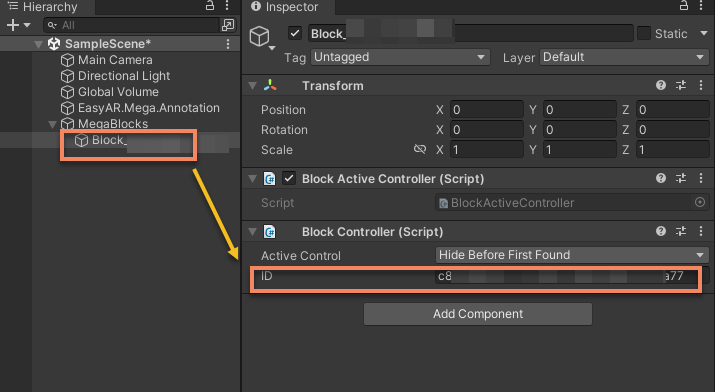
在 Unity 編輯器的場景樹中選擇 Block 節點 記錄它 Inspector 面板上顯示的 ID
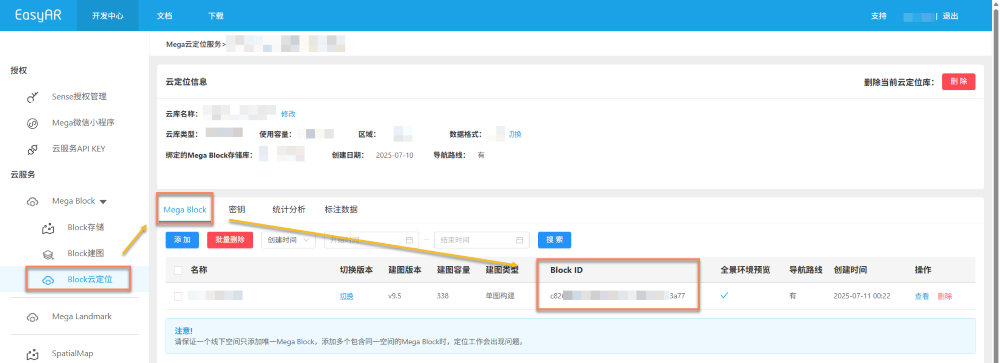
也可以在雲定位庫頁面中查到 Block ID
const blockID = "aaaa1234-bbbb-cccc-dddd-eeeeee123456"
if (!blockHolder.getBlockById(blockParent.id)) {
    // 沒有存在的 Block 節點,創建一個
    blockHolder.holdBlock({
        id: blockID
    })
}
let blockElement = blockHolder.getBlockById(blockParent.id).el;
將模型節點以掛載到指定的 Block 下,分別用 position.setArray(),quaternion.set() 和 scale.setArray() 把修改模型節點的 LocalTransform 。
export interface LocalTransform {
    /** @description 位置 */
    position: xrfs.Vector3;
    /** @description 旋轉 */
    rotation: xrfs.Quaternion;
    /** @description Scale */
    scale: xrfs.Vector3;
}

// 假設有一個已知的在 Block 下的 LocalTransform
const targetTransform: LocalTransform;

blockElement.addChild(modelNode);
let modelTransform = modelNode.getComponent(xrFrameSystem.Transform);
    modelTransform.position.setArray([
        targetTransform.position.x,
        targetTransform.position.y,
        targetTransform.position.z
    ]);
    let annoRotation = new xrFrameSystem.Quaternion().setValue(
        targetTransform.rotation.x,
        targetTransform.rotation.y,
        targetTransform.rotation.z,
        targetTransform.rotation.w
    );
    modelTransform.quaternion.set(annoRotation);
    modelTransform.scale.setArray([
        targetTransform.scale.x,
        targetTransform.scale.y,
        targetTransform.scale.z
    ]);
xr-frame 支持的資源類型
- Texture 紋理和圖像
- CubeTexture 立方體紋理
- VideoTexture 視頻紋理
- EnvData 環境
- GLTF 模型
- Keyframe 幀動畫
- Atlas 圖集
每種資源的加載方法詳細見微信官方文檔及 xr-frame 官方樣例
附註
支持的 GLTF 格式及拓展參考 xr-frame 官方 GLTF 使用說明