Migrate Version 4.6 to Version 4000 Example: Migrating the ImageTracking_Targets Sample
This article describes how to migrate the ImageTracking_Targets sample from EasyAR Sense Unity Plugin version 4.6 to version 4000.
Replace the Plugin Package
Refer to the General Migration Guide to replace the plugin package.
Modify Incompatible Code: Fastest Way to Run
Reimport the StreamingAssets used by the sample:
Original version code:
[UnityEditor.InitializeOnLoadMethod]
static void ImportSampleStreamingAssets()
{
    FileUtil.ImportSampleStreamingAssets();
}
Change to:
private static readonly string[] streamingAssetsFiles = new string[] {
    "EasyARSamples/ImageTargets/idback.etd",
    "EasyARSamples/ImageTargets/namecard.jpg",
};

[UnityEditor.InitializeOnLoadMethod]
static void ImportSampleStreamingAssets()
{
    var pacakge = $"Packages/{UnityPackage.Name}/Samples~/StreamingAssets/ImageTargets/ImageTargets.unitypackage";

    if (streamingAssetsFiles.Where(f => !System.IO.File.Exists(System.IO.Path.Combine(Application.streamingAssetsPath, f))).Any() &&  System.IO.File.Exists>(System.IO.Path.GetFullPath(pacakge)))
    {
        UnityEditor.AssetDatabase.ImportPackage(pacakge, false);
    }
}
Remove the logic that automatically flips the front camera image in Update:
Original version code:
private void Update()
{
    bool isFront = false;
    if(cameraDevice.Device != null)
    {
        using (var cameraParameters = cameraDevice.Device.cameraParameters())
        {
            if (cameraParameters.cameraDeviceType() == CameraDeviceType.Front)
            {
                isFront = true;
            }
        }
    }

    var statusText = "CenterMode: " + Session.CenterMode + Environment.NewLine +
        "CenterObject: " + (Session && Session.CenterObject ? Session.CenterObject.name : null) + Environment.NewLine +
        "HorizontalFlip: " + (isFront ? Session.HorizontalFlipFront : Session.HorizontalFlipNormal) + Environment.NewLine +
        "Camera: " + (cameraDevice && cameraDevice.enabled ? "On" : "Off") + Environment.NewLine +
        "Tracking: " + (imageTracker && imageTracker.enabled ? "On" : "Off") + Environment.NewLine + Environment.NewLine +
        "Target Load Status:" + Environment.NewLine;

    foreach (var item in imageTargetControllers)
    {
        statusText += "\t" + item.Key.gameObject.name + ": " + item.Value + Environment.NewLine;
    }

    Status.text = statusText;
}
Change to:
private void Update()
{
    var statusText = "CenterMode: " + Session.CenterMode + Environment.NewLine +
        "CenterObject: " + (Session && Session.CenterObject ? Session.CenterObject.name : null) + Environment.NewLine +
        //"HorizontalFlip: " + (isFront ? Session.HorizontalFlipFront : Session.HorizontalFlipNormal) + Environment.NewLine +
        "Camera: " + (cameraDevice && cameraDevice.enabled ? "On" : "Off") + Environment.NewLine +
        "Tracking: " + (imageTracker && imageTracker.enabled ? "On" : "Off") + Environment.NewLine + Environment.NewLine +
        "Target Load Status:" + Environment.NewLine;

    foreach (var item in imageTargetControllers)
    {
        statusText += "\t" + item.Key.gameObject.name + ": " + item.Value + Environment.NewLine;
    }

    Status.text = statusText;
}
Use the new API version to update the SwitchHFlipMode() function:
Original version code:
public void SwitchCenterMode()
{
    if (Session.AvailableCenterMode.Count == 0) { return; }
    while (true)
    {
        Session.CenterMode = (ARSession.ARCenterMode)(((int)Session.CenterMode + 1) % Enum.GetValues(typeof(ARSession.ARCenterMode)).Length);
        if (Session.AvailableCenterMode.Contains(Session.CenterMode)) { break; }
    }
}
Change to:
public void SwitchHFlipMode()
{
    Session.HorizontalFlip.FrontCamera = (ARSession.ARHorizontalFlipMode)(((int)Session.HorizontalFlip.FrontCamera + 1) % Enum.GetValues(typeof(ARSession.ARHorizontalFlipMode)).Length);
    Session.HorizontalFlip.BackCamera = (ARSession.ARHorizontalFlipMode)(((int)Session.HorizontalFlip.BackCamera + 1) % Enum.GetValues(typeof(ARSession.ARHorizontalFlipMode)).Length);
}
Use the new API version to update the NextCamera() function:
Original version code:
public void NextCamera()
{
    if (!cameraDevice || cameraDevice.Device == null)
    {
        return;
    }
    if (CameraDevice.cameraCount() == 0)
    {
        GUIPopup.EnqueueMessage("Camera unavailable", 3);
        cameraDevice.Close();
        return;
    }

    var index = cameraDevice.Device.index();
    index = (index + 1) % CameraDevice.cameraCount();
    cameraDevice.CameraOpenMethod = CameraDeviceFrameSource.CameraDeviceOpenMethod.DeviceIndex;
    cameraDevice.CameraIndex = index;
    GUIPopup.EnqueueMessage("Switch to camera index: " + index, 3);

    cameraDevice.Close();
    cameraDevice.Open();
}
Change to:
public void NextCamera()
{
    if (!cameraDevice || cameraDevice.Opened)
    {
        return;
    }
    if (CameraDeviceFrameSource.CameraCount == 0)
    {
        cameraDevice.Close();
        return;
    }

    var index = cameraDevice.Index;
    index = (index + 1) % CameraDeviceFrameSource.CameraCount;
    cameraDevice.CameraOpenMethod = CameraDeviceFrameSource.CameraDeviceOpenMethod.DeviceIndex;
    cameraDevice.CameraOpenIndex = index;

    cameraDevice.Close();
    cameraDevice.Open();
}
Use the new API version to update the CreateTargets() function:
Original version code:
private void CreateTargets()
{
    // dynamically load from image (*.jpg, *.png)
    var targetController = CreateTargetNode("ImageTarget-argame00");
    targetController.Tracker = imageTracker;
    targetController.SourceType = ImageTargetController.DataSource.ImageFile;
    targetController.ImageFileSource.PathType = PathType.StreamingAssets;
    targetController.ImageFileSource.Path = "sightplus/argame00.jpg";
    targetController.ImageFileSource.Name = "argame00";
    targetController.ImageFileSource.Scale = 0.1f;

    GameObject duck02 = Instantiate(Resources.Load("duck02")) as GameObject;
    duck02.transform.parent = targetController.gameObject.transform;

    // dynamically load from json string

    foreach (var image in imageJosn.images)
    {
        targetController = CreateTargetNode("ImageTarget-" + image.name);
        targetController.Tracker = imageTracker;
        targetController.ImageFileSource.PathType = PathType.StreamingAssets;
        targetController.ImageFileSource.Path = image.image;
        targetController.ImageFileSource.Name = image.name;
        targetController.ImageFileSource.Scale = image.scale;

        var duck03 = Instantiate(Resources.Load("duck03")) as GameObject;
        duck03.transform.parent = targetController.gameObject.transform;
    }
}
Change to:
private void CreateTargets()
{
    // dynamically load from image (*.jpg, *.png)
    var targetController = CreateTargetNode("ImageTarget-argame00");
    targetController.Tracker = imageTracker;
    targetController.Source = new ImageTargetController.TargetDataFileSourceData
    {
        PathType = PathType.StreamingAssets,
        Path = "idback.etd",
    };

    GameObject duck02 = Instantiate(Resources.Load("duck02")) as GameObject;
    duck02.transform.parent = targetController.gameObject.transform;

    // dynamically load from json string ...

    foreach (var image in imageJson.images)
    {
        targetController = CreateTargetNode("ImageTarget-" + image.name);
        targetController.Tracker = imageTracker;
        targetController.Source = new ImageTargetController.ImageFileSourceData
        {
            Path = image.image,
            Name = image.name,
            Scale = 0.1f,
        };

        var duck03 = Instantiate(Resources.Load("duck03")) as GameObject;
        duck03.transform.parent = targetController.gameObject.transform;
    }
}
Use the new API version to update the AddTargetControllerEvents(ImageTargetController controller) function:
Original version code:
private void AddTargetControllerEvents(ImageTargetController controller)
{
    if (!controller)
    {
        return;
    }

    controller.TargetFound += () =>
    {
        Debug.LogFormat("Found target {{id = {0}, name = {1}}}", controller.Target.runtimeID(), controller.Target.name());
    };
    controller.TargetLost += () =>
    {
        Debug.LogFormat("Lost target {{id = {0}, name = {1}}}", controller.Target.runtimeID(), controller.Target.name());
    };
    controller.TargetLoad += (Target target, bool status) =>
    {
        imageTargetControllers[controller] = status ? true : imageTargetControllers[controller];
        Debug.LogFormat("Load target {{id = {0}, name = {1}, size = {2}}} into {3} => {4}", target.runtimeID(), target.name(), controller.Size,  >controller.Tracker.name, status);
    };
    controller.TargetUnload += (Target target, bool status) =>
    {
        imageTargetControllers[controller] = status ? false : imageTargetControllers[controller];
        Debug.LogFormat("Unload target {{id = {0}, name = {1}}} => {2}", target.runtimeID(), target.name(), status);
    };
}
Change to:
private void AddTargetControllerEvents(ImageTargetController controller)
{
    if (!controller)
    {
        return;
    }

    controller.TargetFound += () =>
    {
        Debug.LogFormat("Found target {{id = {0}, name = {1}}}", controller.Target.runtimeID(), controller.Target.name());
    };
    controller.TargetLost += () =>
    {
        Debug.LogFormat("Lost target {{id = {0}, name = {1}}}", controller.Target.runtimeID(), controller.Target.name());
    };
    controller.TargetDataLoad += (bool status) =>
    {
        imageTargetControllers[controller] = status ? true : imageTargetControllers[controller];
        Debug.LogFormat("Load target {{id = {0}, name = {1}, size = {2}}} into {3} => {4}", controller.Target == null? controller.Target.runtimeID> ():string.Empty, controller.Target.name(), controller.Size, controller.Tracker.name, status);
    };
}
At this point, the sample can basically run.
Rebuild the Scene: Prepare to Use New Features
Delete the AR Session from the scene:
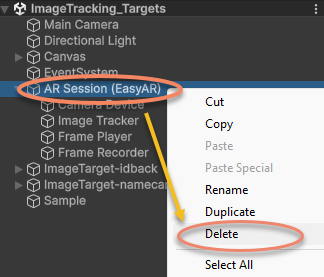
Recreate the AR Session:
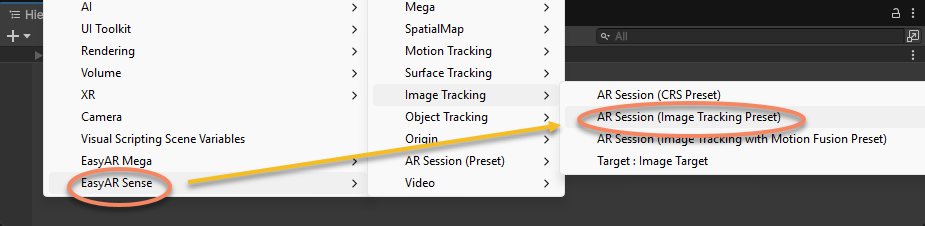
Reassign the ImageTrackerFrameFilter of ImageTarget-idback in the scene:
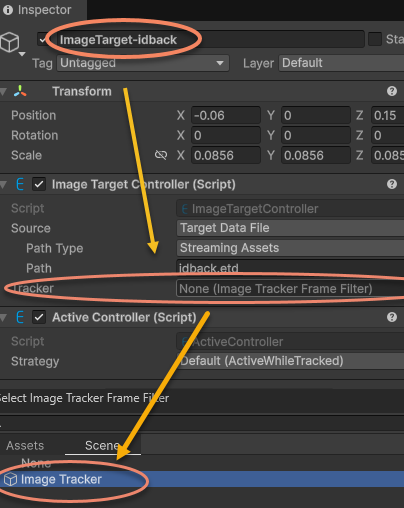
Reassign the ImageTrackerFrameFilter of ImageTarget-namecard in the scene:
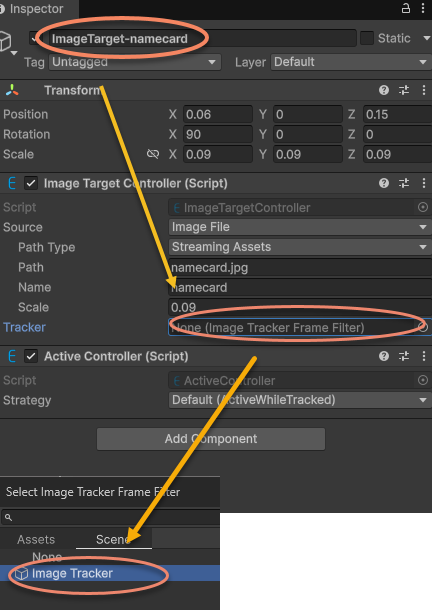
Reassign ARSession in the sample script to the newly created AR Session (EasyAR):
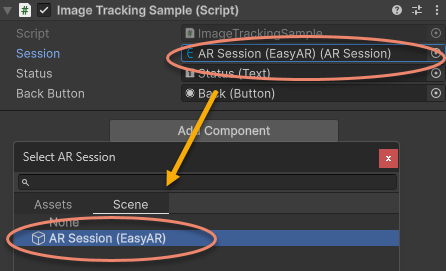
At this point, the sample scene and script have both been updated to version 4000.0 and can run.
You can also adjust ImageTarget parameters to use the new Texture2D loading method.