Migrating from version 4.6 to version 4000 instance: migrating the SpatialMap_Sparse_Building example
This article explains how to migrate the SpatialMap_Sparse_Building example from EasyAR Sense Unity Plugin version 4.6 to version 4000.
Replacing the plugin package
Refer to the General migration guide to replace the plugin package.
Modifying incompatible code: fastest runnable version
Replace SparseSpatialMapWorkerFrameFilter with SparseSpatialMapBuilderFrameFilter in the original MapBuilding_SparseSample script:
Original version code:
private SparseSpatialMapWorkerFrameFilter sparse;Modified to:
private SparseSpatialMapBuilderFrameFilter sparse;
Update the code for obtaining SparseSpatialMapBuilderFrameFilter in Awake:
Original version code:
sparse = Session.GetComponentInChildren<SparseSpatialMapWorkerFrameFilter>();Modified to:
Session.StateChanged += (state) =>
{
    if (state == ARSession.SessionState.Ready)
    {
        sparse = Session.Assembly.FrameFilters.Where(f => f is SparseSpatialMapBuilderFrameFilter).FirstOrDefault() as SparseSpatialMapBuilderFrameFilter;
    }
};
Remove the code for printing Status in Update, and update the sparse spatial map reference to sparse.Target according to the new version API:
Original version code:
private void Update()
{
    Status.text = $"Device Model: {SystemInfo.deviceModel} {deviceModel}" + Environment.NewLine +
        "Frame Source: " + ((Session.Assembly != null && Session.Assembly.FrameSource) ? Session.Assembly.FrameSource.GetType().ToString().Replace("easyar.", "").Replace("FrameSource", "") : "-") + Environment.NewLine +
        "Tracking Status: " + Session.TrackingStatus + Environment.NewLine +
        "Sparse Point Cloud Count: " + (sparse.LocalizedMap == null ? "-" : sparse.LocalizedMap.PointCloud.Count.ToString()) + Environment.NewLine +
        "Cube Location: " + (onSparse ? "On Sparse Spatial Map" : (Session.TrackingStatus.OnSome && Session.TrackingStatus != MotionTrackingStatus.NotTracking ? "Air" : "-")) + Environment.NewLine +
        Environment.NewLine +
        "Gesture Instruction" + Environment.NewLine +
        "\tMove to Sparse Spatial Map Point: One Finger Move" + Environment.NewLine +
        "\tScale: Two Finger Pinch";

    if (Input.touchCount == 1 && !EventSystem.current.IsPointerOverGameObject(Input.GetTouch(0).fingerId))
    {
        var touch = Input.touches[0];
        if (touch.phase == TouchPhase.Moved)
        {
            var viewPoint = new Vector2(touch.position.x / Screen.width, touch.position.y / Screen.height);
            if (sparse && sparse.LocalizedMap)
            {
                var points = sparse.LocalizedMap.HitTest(viewPoint);
                foreach (var point in points)
                {
                    onSparse = true;
                    TouchControl.transform.position = sparse.LocalizedMap.transform.TransformPoint(point);
                    break;
                }
            }
        }
    }
}
Modified to:
private void Update()
{
    if (Input.touchCount == 1 && !EventSystem.current.IsPointerOverGameObject(Input.GetTouch(0).fingerId))
    {
        var touch = Input.touches[0];
        if (touch.phase == TouchPhase.Moved)
        {
            var viewPoint = new Vector2(touch.position.x / Screen.width, touch.position.y / Screen.height);
            if (sparse && sparse.Target)
            {
                var points = sparse.Target.HitTest(viewPoint);
                foreach (var point in points)
                {
                    TouchControl.transform.position = sparse.Target.transform.TransformPoint(point);
                    break;
                }
            }
        }
    }
}
The sample is now basically runnable.
Rebuilding the scene: preparing to use new features
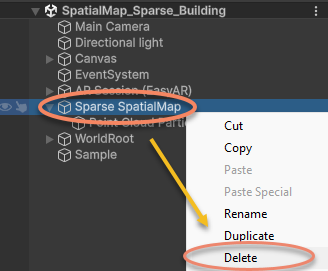
Delete the Sparse SpatialMap node in the scene:
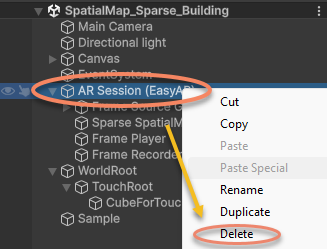
Delete the AR Session in the scene:
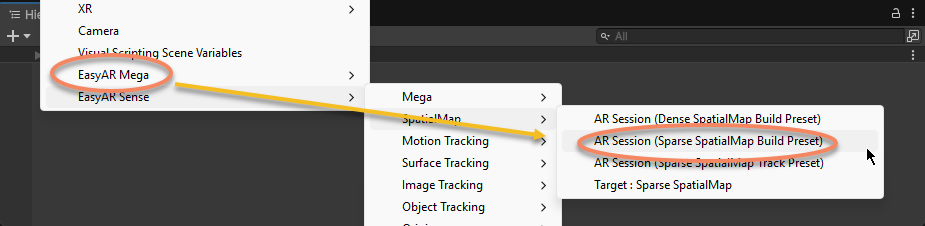
Recreate the AR Session:
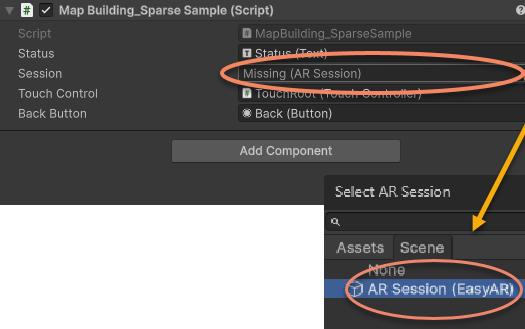
Reassign the ARSession in the sample script to the newly created AR Session (EasyAR):
The sample scene and scripts are now updated to version 4000.0 and runnable.