Esempio di migrazione dalla versione 4.6 alla versione 4000: migrare il sample SpatialMap_Sparse_Localizing
Questo articolo descrive come migrare il sample SpatialMap_Sparse_Localizing da EasyAR Sense Unity Plugin versione 4.6 alla versione 4000.
Sostituire il pacchetto plugin
Fare riferimento alla guida generale alla migrazione per sostituire il pacchetto plugin.
Ricostruire la scene (obbligatorio)
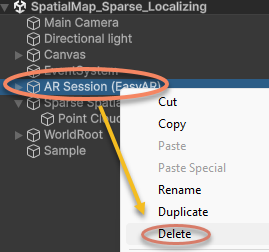
Eliminare AR Session dalla scene:
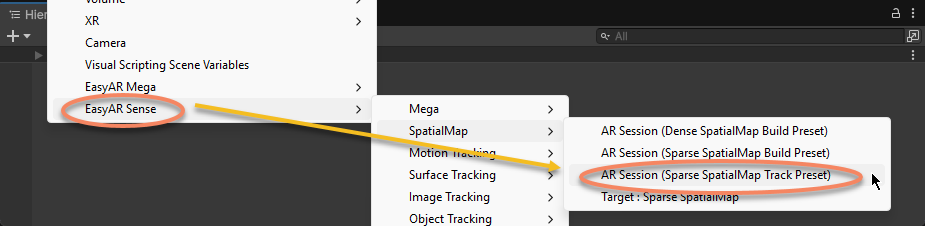
Ricreare AR Session:
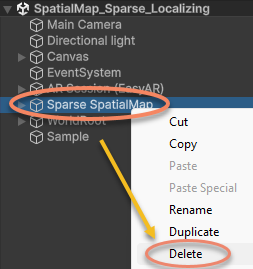
Eliminare Sparse SpatialMap dalla scene:
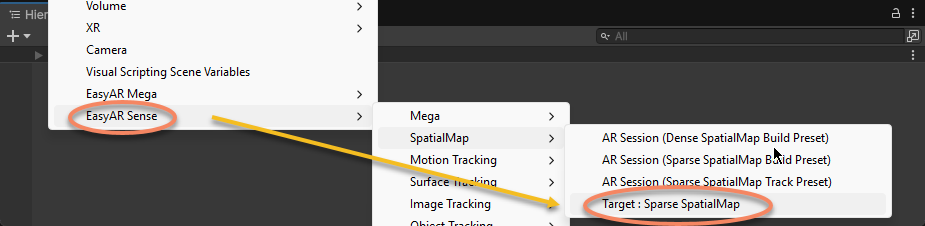
Ricreare Sparse SpatialMap:
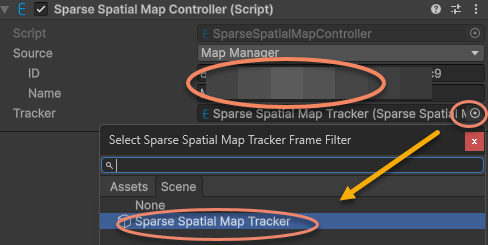
Nella finestra Inspector del componente Sparse SpatialMap Controller, inserire ID e Name della sparse spatial map e specificare il Tracker:
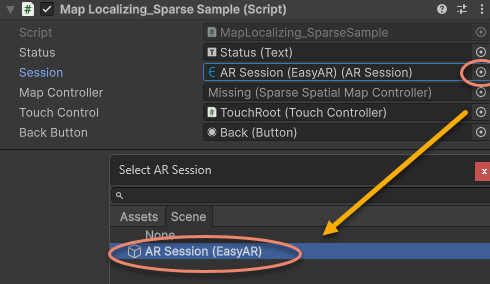
Riassegnare ARSession nello script del sample alla nuova AR Session (EasyAR):
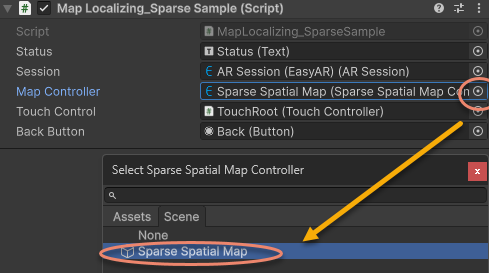
Riassegnare MapController nello script del sample al nuovo Sparse SpatialMap Controller:
Modificare il codice incompatibile
Rimuovere il codice che stampa Status in Start e aggiornare i callback di localization della sparse spatial map a MapController.TargetFound e MapController.TargetLost secondo l'API della nuova versione:
Codice della versione precedente:
sparse = Session.GetComponentInChildren<SparseSpatialMapWorkerFrameFilter>();

if (string.IsNullOrEmpty(MapController.MapManagerSource.ID) || string.IsNullOrEmpty(MapController.MapManagerSource.Name))
{
    throw new UIPopupException("Map ID or Name NOT set, please set MapManagerSource on: " + MapController + Environment.NewLine +
        "To create SpatialMap, use <SpatialMap_SparseSpatialMap> sample." + Environment.NewLine +
        "To get Map ID and Name, use EasyAR Develop Center (www.easyar.com) -> SpatialMap -> Database Details." + Environment.NewLine +
        "Map ID is used when loading, it can be used to share maps among devices.", 100);
}

MapController.MapLoad += (map, status, error) =>
{
    GUIPopup.EnqueueMessage("Load map {name = " + map.Name + ", id = " + map.ID + "} into " + sparse.name + Environment.NewLine +
        " => " + status + (string.IsNullOrEmpty(error) ? "" : " <" + error + ">"), status ? 3 : 5);

    if (!status)
    {
        return;
    }

    GUIPopup.EnqueueMessage("Notice: load map (only the first time each map) will trigger a download in this sample." + Environment.NewLine +
        "Statistical request count will be increased (more details on EasyAR website)." + Environment.NewLine +
        "Map cache is used after a successful download." + Environment.NewLine +
        "Map cache will be cleared if SparseSpatialMapManager.clear is called or app uninstalled.", 5);
};

MapController.MapLocalized += () =>
{
    GUIPopup.EnqueueMessage("Localized map {name = " + MapController.MapInfo.Name + "}", 3);
};

MapController.MapStopLocalize += () =>
{
    GUIPopup.EnqueueMessage("Stopped localize map {name = " + MapController.MapInfo.Name + "}", 3);
};

sparse.Localizer.startLocalization();
Modificare in:
sparse = Session.GetComponentInChildren<SparseSpatialMapWorkerFrameFilter>();

MapController.TargetFound += () =>
{
    Debug.Log($"Found target {{name = {MapController.Info.Name}}}");
};

MapController.TargetLost += () =>
{
    if (!MapController) { return; }
    Debug.Log($"Lost target {{name = {MapController.Info.Name}}}");
};
Usare la nuova API in Update per determinare se la Sparse Spatial Map esiste ed è tracciata direttamente:
Codice della versione originale:
private void Update()
{
    Status.text = $"Device Model: {SystemInfo.deviceModel} {deviceModel}" + Environment.NewLine +
        "VIO Device" + Environment.NewLine +
        "\tType: " + ((Session.Assembly != null && Session.Assembly.FrameSource) ? Session.Assembly.FrameSource.GetType().ToString().Replace("easyar.", "").Replace("FrameSource", "") : "-") + Environment.NewLine +
        "\tTracking Status: " + Session.TrackingStatus + Environment.NewLine +
        "Sparse Spatial Map" + Environment.NewLine +
        "\tWorking Mode: " + sparse.WorkingMode + Environment.NewLine +
        "\tLocalization Mode: " + sparse.LocalizerConfig.LocalizationMode + Environment.NewLine +
        "Localized Map" + Environment.NewLine +
        "\tName: " + (sparse.LocalizedMap == null ? "-" : (sparse.LocalizedMap.MapInfo == null ? "-" : sparse.LocalizedMap.MapInfo.Name)) + Environment.NewLine +
        "\tID: " + (sparse.LocalizedMap == null ? "-" : (sparse.LocalizedMap.MapInfo == null ? "-" : sparse.LocalizedMap.MapInfo.ID)) + Environment.NewLine +
        "\tPoint Cloud Count: " + (sparse.LocalizedMap == null ? "-" : sparse.LocalizedMap.PointCloud.Count.ToString()) + Environment.NewLine +
        "Cube Location: " + (onSparse ? "On Sparse Spatial Map" : (Session.TrackingStatus.OnSome && Session.TrackingStatus != MotionTrackingStatus.NotTracking ? "Air" : "-")) + Environment.NewLine +
        Environment.NewLine +
        "Gesture Instruction" + Environment.NewLine +
        "\tMove to Sparse Spatial Map Point: One Finger Move" + Environment.NewLine +
        "\tScale: Two Finger Pinch";

    if (Input.touchCount == 1 && !EventSystem.current.IsPointerOverGameObject(Input.GetTouch(0).fingerId))
    {
        var touch = Input.touches[0];
        if (touch.phase == TouchPhase.Moved)
        {
            var viewPoint = new Vector2(touch.position.x / Screen.width, touch.position.y / Screen.height);
            if (sparse && sparse.LocalizedMap)
            {
                var points = sparse.LocalizedMap.HitTest(viewPoint);
                foreach (var point in points)
                {
                    onSparse = true;
                    TouchControl.transform.position = sparse.LocalizedMap.transform.TransformPoint(point);
                    break;
                }
            }
        }
    }
}
Modificare in:
private void Update()
{
    if (Input.touchCount == 1 && !EventSystem.current.IsPointerOverGameObject(Input.GetTouch(0).fingerId))
    {
        var touch = Input.touches[0];
        if (touch.phase == TouchPhase.Moved)
        {
            var viewPoint = new Vector2(touch.position.x / Screen.width, touch.position.y / Screen.height);
            if (MapController && MapController.IsDirectlyTracked)
            {
                var points = MapController.HitTest(viewPoint);
                foreach (var point in points)
                {
                    onSparse = true;
                    TouchControl.transform.position = MapController.transform.TransformPoint(point);
                    break;
                }
            }
        }
    }
}
A questo punto la scene e gli script del sample sono stati aggiornati alla versione 4000.0 e possono essere eseguiti.