4.6 から 4000 への移行例: SpatialMap_Sparse_Building サンプルの移行
この記事では、SpatialMap_Sparse_Building サンプルを EasyAR Sense Unity Plugin 4.6 から 4000 に移行する方法を説明します。
プラグインパッケージを置き換える
プラグインパッケージの置き換えは 一般的な移行ガイド を参照してください。
互換性のないコードを変更する: 最短で動かす方法
元の MapBuilding_SparseSample スクリプト内の SparseSpatialMapWorkerFrameFilter を SparseSpatialMapBuilderFrameFilter に置き換えます。
旧バージョンのコード:
private SparseSpatialMapWorkerFrameFilter sparse;次のように変更します:
private SparseSpatialMapBuilderFrameFilter sparse;
Awake で SparseSpatialMapBuilderFrameFilter を取得するコードを更新します。
旧バージョンのコード:
sparse = Session.GetComponentInChildren<SparseSpatialMapWorkerFrameFilter>();次のように変更します:
Session.StateChanged += (state) =>
{
    if (state == ARSession.SessionState.Ready)
    {
        sparse = Session.Assembly.FrameFilters.Where(f => f is SparseSpatialMapBuilderFrameFilter).FirstOrDefault() as SparseSpatialMapBuilderFrameFilter;
    }
};
Update の Status 表示コードを削除し、新しい API に合わせて sparse spatial map の参照を sparse.Target に更新します。
旧バージョンのコード:
private void Update()
{
    Status.text = $"Device Model: {SystemInfo.deviceModel} {deviceModel}" + Environment.NewLine +
        "Frame Source: " + ((Session.Assembly != null && Session.Assembly.FrameSource) ? Session.Assembly.FrameSource.GetType().ToString().Replace》("easyar.", "").Replace("FrameSource", "") : "-") + Environment.NewLine +
        "Tracking Status: " + Session.TrackingStatus + Environment.NewLine +
        "Sparse Point Cloud Count: " + (sparse.LocalizedMap == null ? "-" : sparse.LocalizedMap.PointCloud.Count.ToString()) + Environment.NewLine +
        "Cube Location: " + (onSparse ? "On Sparse Spatial Map" : (Session.TrackingStatus.OnSome && Session.TrackingStatus != 》MotionTrackingStatus.NotTracking ? "Air" : "-")) + Environment.NewLine +
        Environment.NewLine +
        "Gesture Instruction" + Environment.NewLine +
        "	Move to Sparse Spatial Map Point: One Finger Move" + Environment.NewLine +
        "	Scale: Two Finger Pinch";

    if (Input.touchCount == 1 && !EventSystem.current.IsPointerOverGameObject(Input.GetTouch(0).fingerId))
    {
        var touch = Input.touches[0];
        if (touch.phase == TouchPhase.Moved)
        {
            var viewPoint = new Vector2(touch.position.x / Screen.width, touch.position.y / Screen.height);
            if (sparse && sparse.LocalizedMap)
            {
                var points = sparse.LocalizedMap.HitTest(viewPoint);
                foreach (var point in points)
                {
                    onSparse = true;
                    TouchControl.transform.position = sparse.LocalizedMap.transform.TransformPoint(point);
                    break;
                }
            }
        }
    }
}
次のように変更します:
private void Update()
{
    if (Input.touchCount == 1 && !EventSystem.current.IsPointerOverGameObject(Input.GetTouch(0).fingerId))
    {
        var touch = Input.touches[0];
        if (touch.phase == TouchPhase.Moved)
        {
            var viewPoint = new Vector2(touch.position.x / Screen.width, touch.position.y / Screen.height);
            if (sparse && sparse.Target)
            {
                var points = sparse.Target.HitTest(viewPoint);
                foreach (var point in points)
                {
                    TouchControl.transform.position = sparse.Target.transform.TransformPoint(point);
                    break;
                }
            }
        }
    }
}
この時点で、サンプルは基本的に実行できる状態になります。
シーンを再構築する: 新機能の使用準備
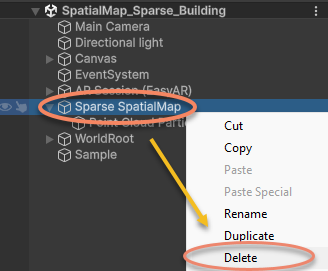
シーン内の Sparse SpatialMap ノードを削除します。
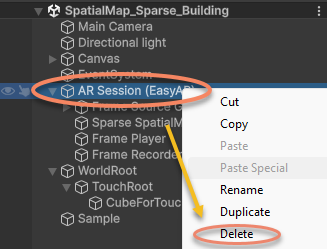
シーン内の AR Session を削除します。
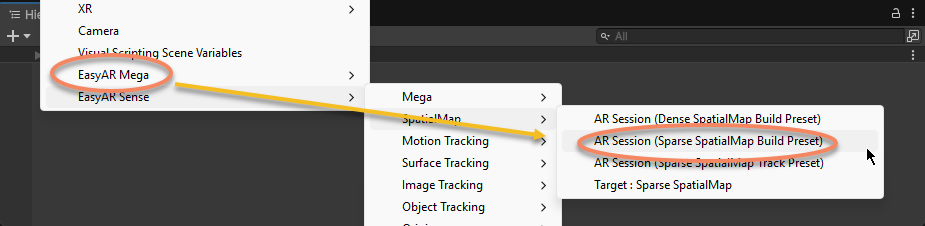
AR Session を再作成します。
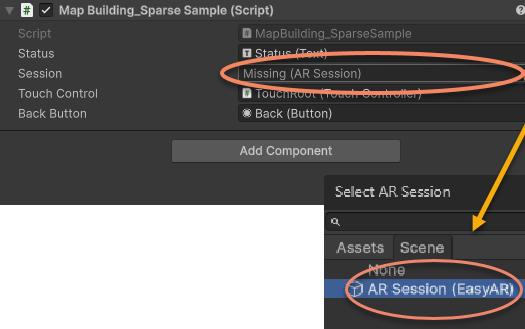
サンプルスクリプト内の ARSession を、新しく作成した AR Session (EasyAR) に再設定します。
この時点で、サンプルのシーンとスクリプトは 4000.0 に更新され、実行可能です。