Target image의 recognizable area가 너무 적거나(예: white wall, solid color block), texture가 너무 단순하면 recognition success rate가 크게 낮아집니다. 이 장에서는 CRS rating mechanism을 자세히 설명하여 고품질 AR recognition material을 선별할 수 있도록 돕습니다.
주로 다음 두 comprehensive metrics에 주목합니다. 이 두 metric은 각각 별도의 API endpoint를 가지며 comprehensive rating을 제공합니다.
이 metrics는 image algorithm 차원에서 rating하며, 각 metric은 난이도에 따라 여전히 0부터 4까지 제공됩니다.
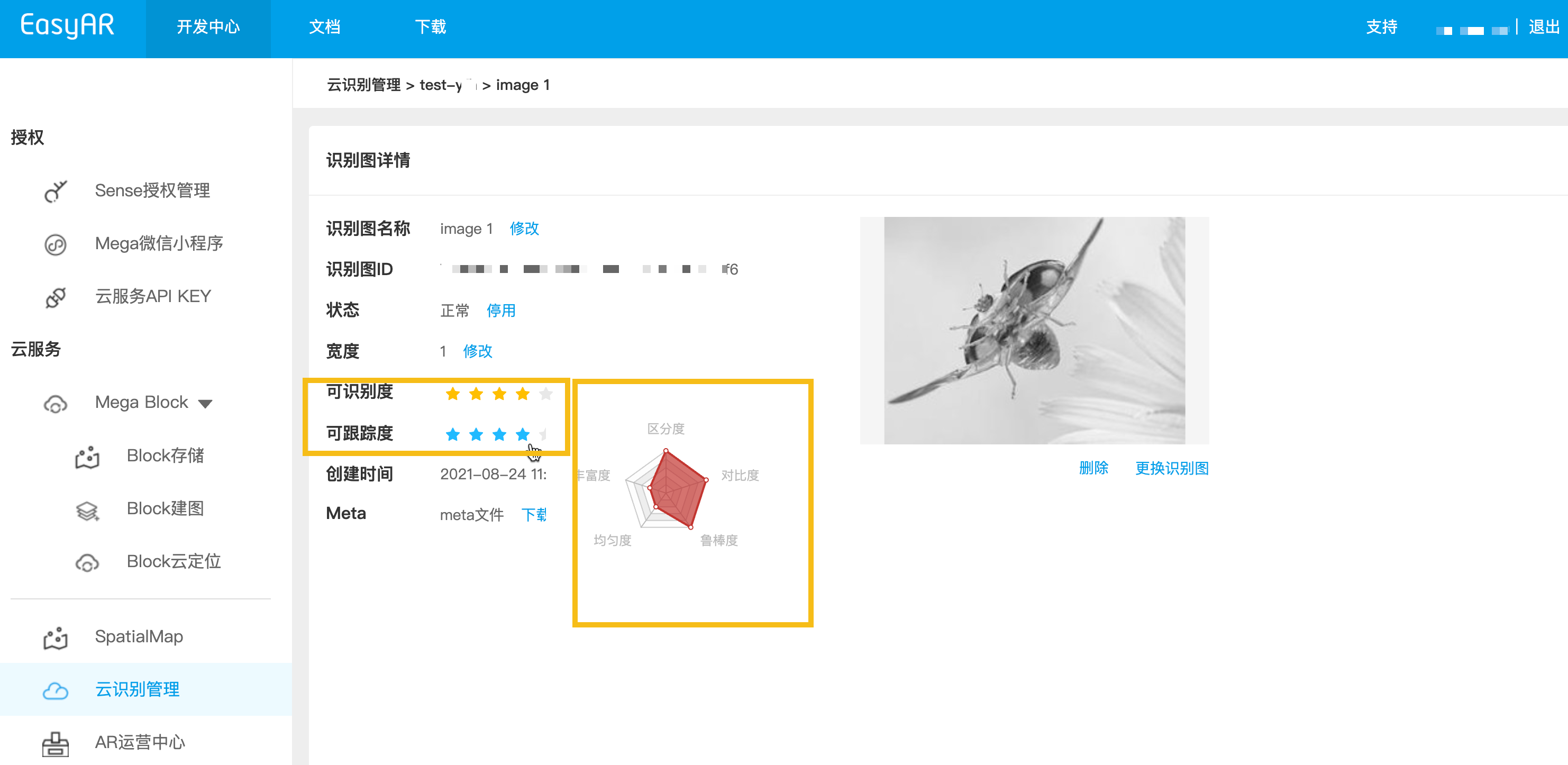
Database의 각 target image 상세 정보에는 target image의 detailed rating이 있습니다. API를 통해 target image properties를 가져와 확인할 수 있으며, EasyAR cloud recognition management를 통해서도 확인할 수 있습니다.
그림과 같이 detail page에는 두 개의 core comprehensive metrics가 있으며, pentagon은 다섯 개의 detailed metrics를 표시합니다.
Automated upload backend를 구축할 때 정식 upload 전에 rating endpoint를 호출하는 것이 좋습니다.
- 먼저 로컬 target 이미지를 Base64(macOS / Linux)로 변환하고 결과를 image_base64.txt에 저장합니다
base64 -i ./target.jpg | tr -d '\n' > image_base64.txt
- 플레이스홀더를 실제 매개변수로 바꾸고 curl 스크립트를 실행하십시오
- Your-Server-side-URL → 실제 API Host
- Your-Token → 실제 API Key Authorization Token
- Your-CRS-AppId → 사용자의 appId
curl -X POST "https://<Your-Server-side-URL>/grade/detail" \
  -H "Content-Type: application/json" \
  -H "Authorization: <YOUR-TOKEN>" \
  -d '{
    "appId": "<Your-CRS-AppId>",
    "image": "'"$(cat image_base64.txt)"'"
  }'
Java 예제 코드 다운로드
Maven 방식으로 프로젝트 가져오기
Step 1. 관련 코드 파일 Grade.java를 엽니다
Step 2. 전역 변수를 수정하고 준비 체크리스트의 인증 파라미터로 교체합니다
- CRS AppId
- API Key / API Secret
- Server-end URL
- IMAGE_PATH: 업로드할 target image 파일
import okhttp3.*;
import org.json.JSONObject;
import java.io.IOException;
import java.nio.file.Files;
import java.nio.file.Path;
import java.nio.file.Paths;
import java.util.Base64;
import java.util.HashMap;
import java.util.Map;

public class Grade {
    private static final String TARGET_MGMT_URL = "http://cn1.crs.easyar.com:8888";
    private static final String CRS_APPID       = "--here is your CRS AppId--";
    private static final String API_KEY         = "--here is your API Key--";
    private static final String API_SECRET      = "--here is your API Secret--";
    private static final String IMAGE_PATH      = "test_target_image.jpg";

    enum GradeType {
        DETAIL,
        DETECTION,
        TRACKING
    }
    private static final Map<GradeType, String> GRADE_URL = new HashMap<GradeType, String>(){
        {
            put(GradeType.DETAIL,    "/grade/detail") ;
            put(GradeType.DETECTION, "/grade/detection") ;
            put(GradeType.TRACKING, "/grade/tracking") ;
        }
    };

    public String grade(Auth auth, String imgPath, GradeType gradeType) throws IOException {
        final Path mImagePath   = Paths.get(imgPath);
        JSONObject params = new JSONObject().put("image", Base64.getEncoder().encodeToString(
                Files.readAllBytes(mImagePath)
        ));
        Auth.signParam(params, auth.getAppId(), auth.getApiKey(), auth.getApiSecret());
        RequestBody requestBody = FormBody.create(MediaType.parse("application/json; charset=utf-8")
                , params.toString());
        Request request = new Request.Builder()
                .url(auth.getCloudURL() + GRADE_URL.get(gradeType))
                .post(requestBody)
                .build();
        return new OkHttpClient.Builder().build().newCall(request).execute().body().string();
    }

    public static void main(String[] args) throws IOException {
        Auth accessInfo  =  new Auth(CRS_APPID, API_KEY, API_SECRET, TARGET_MGMT_URL);

        System.out.println("================== grade details ==================");
        System.out.println(new Grade().grade(accessInfo, IMAGE_PATH, GradeType.DETAIL));

        System.out.println("================== grade for detection ==================");
        JSONObject gradeResp = new JSONObject(new Grade().grade(accessInfo, IMAGE_PATH, GradeType.DETECTION));
        System.out.println("Detection grade: " + gradeResp.getJSONObject(Common.KEY_RESULT).get(Common.KEY_GRADE));

        System.out.println("================== grade for tracking =================== ");
        gradeResp = new JSONObject(new Grade().grade(accessInfo, IMAGE_PATH, GradeType.TRACKING));
        System.out.println("Tracking grade: " + gradeResp.getJSONObject(Common.KEY_RESULT).get(Common.KEY_GRADE));
    }
}
Step 3. Main 실행
NodeJS sample code를 다운로드합니다
Step 1. key file keys.json 구성
- CRS AppId
- API Key / API Secret
{
  "appId": "--here is your appId for CRS App Instance for SDK 4--",
  "apiKey": "--here is your api key which is create from website and which has crs permission--",
  "apiSecret": "--here is your api secret which is create from website--"
}
Step 2. test image, key file 및 Server-end URL을 지정하여 실행합니다
node bin/grade test.jpeg -t <Server-end-URL> -c keys.json
var argv = require('yargs')
    .usage('Usage: $0 [image] -t [host] -c [keys]')
    .demand(1)
    .default('t', 'http://localhost:8888').alias('t', 'host')
    .default('c', 'keys.json').alias('c', 'keys')
    .help('h').alias('h', 'help')
    .epilog('copyright 2015, sightp.com')
    .argv;

var fs = require('fs');

var imageFn = argv._[0];
var host = argv.host;
var keys = JSON.parse(fs.readFileSync(argv.keys));

var farmer = require('../farmer')(host, keys);

farmer.getTrackingGrade({
    'image': fs.readFileSync(imageFn).toString('base64')
})
.then(function(resp) {
    console.log(resp);
})
.fail(function(err) {
    console.log(err);
});
PHP 샘플 코드를 다운로드합니다
Step 1. 진입 코드 demo.php를 엽니다
Step 2. 전역 변수를 수정하고 준비한 목록의 인증 매개변수로 바꿉니다
- CRS AppId
- API Key / API Secret
- Server-end URL
- imageFilePath : 업로드할 대상 이미지 파일 경로
<?php
include 'EasyARClientSdkCRS.php';
$apiKey = 'API Key';
$apiSecret = 'API Secret';
$crsAppId = 'CRS AppId'
$crsCloudUrl = 'https://cn1-crs.easyar.com';
$imageFilePath = '1.jpg'

$sdk = new EasyARClientSdkCRS($apiKey, $apiSecret, $crsAppId, $crsCloudUrl);

$image = base64_encode(file_get_contents($imageFilePath));
$rs = $sdk->detection($image);
if ($rs->statusCode == 0) {
  print_r($rs->result->grade);
} else {
  print_r($rs);
}
Step 3. php demo.php를 실행합니다
관련 코드 파일 grade.py를 새로 만들고 global variables를 수정한 다음 실행합니다
pip install requests
python grade.py
import time
import hashlib
import requests
import base64

# --- Global Configuration ---
API_KEY = "YOUR_API_KEY"
API_SECRET = "YOUR_API_SECRET"
APP_ID = "YOUR_APP_ID"
HOST = "https://crs-cn1.easyar.com"
IMAGE_PATH = "test.jpg"

def main():
    # 1. Read and encode image
    with open(IMAGE_PATH, "rb") as f:
        image_base64 = base64.b64encode(f.read()).decode('utf-8')

    timestamp = str(int(time.time() * 1000))

    # 2. Build parameter dictionary (including image)
    params = {
        'apiKey': API_KEY,
        'appId': APP_ID,
        'timestamp': timestamp,
        'image': image_base64
    }

    # 3. Sort by key and concatenate
    sorted_keys = sorted(params.keys())
    builder = "".join([f"{k}{params[k]}" for k in sorted_keys])
    builder += API_SECRET

    # 4. Generate SHA256 Signature
    signature = hashlib.sha256(builder.encode('utf-8')).hexdigest()

    # 5. Send POST request
    payload = {**params, "signature": signature, "timestamp": int(timestamp)}
    response = requests.post(f"{HOST}/grade/detection", json=payload)

    print(f"Status: {response.status_code}")
    print(f"Response: {response.text}")

if __name__ == "__main__":
    main()
관련 코드 파일 main.go를 만들고 전역 변수를 수정한 다음 실행합니다.
go run main.go
main.go:
package main

import (
  "bytes"
  "crypto/sha256"
  "encoding/base64"
  "encoding/json"
  "fmt"
  "io"
  "net/http"
  "os"
  "sort"
  "strconv"
  "time"
)

var (
  ApiKey    = "YOUR_API_KEY"
  ApiSecret = "YOUR_API_SECRET"
  AppId     = "YOUR_APP_ID"
  Host      = "https://crs-cn1.easyar.com"
  ImagePath = "test.jpg"
)

func main() {
  fileData, _ := os.ReadFile(ImagePath)
  imgBase64 := base64.StdEncoding.EncodeToString(fileData)

  tsInt := time.Now().UnixNano() / 1e6
  tsStr := strconv.FormatInt(tsInt, 10)

  params := map[string]string{
    "apiKey":    ApiKey,
    "appId":     AppId,
    "timestamp": tsStr,
    "image":     imgBase64,
  }

  keys := make([]string, 0, len(params))
  for k := range params { keys = append(keys, k) }
  sort.Strings(keys)

  var builder bytes.Buffer
  for _, k := range keys {
    builder.WriteString(k)
    builder.WriteString(params[k])
  }
  builder.WriteString(ApiSecret)

  signature := fmt.Sprintf("%x", sha256.Sum256(builder.Bytes()))

  payload := map[string]interface{}{
    "image":     imgBase64,
    "apiKey":    ApiKey,
    "appId":     AppId,
    "timestamp": tsInt,
    "signature": signature,
  }
  jsonBytes, _ := json.Marshal(payload)

  resp, _ := http.Post(Host+"/grade/detection", "application/json", bytes.NewBuffer(jsonBytes))
  defer resp.Body.Close()
  body, _ := io.ReadAll(resp.Body)
  fmt.Printf("Response: %s\n", string(body))
}
Cargo.toml에 reqwest, tokio, sha2, hex 의존성을 추가합니다.
cargo run을 실행합니다.
use sha2::{Sha256, Digest};
use std::collections::BTreeMap;
use std::time::{SystemTime, UNIX_EPOCH};
use base64::{Engine as _, engine::general_purpose};
const API_KEY: &str = "YOUR_API_KEY";
const API_SECRET: &str = "YOUR_API_SECRET";
const APP_ID: &str = "YOUR_APP_ID";
const HOST: &str = "https://crs-cn1.easyar.com";
const IMAGE_PATH: &str = "test.jpg";
#[tokio::main]
async fn main() -> Result<(), Box<dyn std::error::Error>> {
let img_bytes = std::fs::read(IMAGE_PATH)?;
let img_b64 = general_purpose::STANDARD.encode(img_bytes);
let ts_raw = SystemTime::now().duration_since(UNIX_EPOCH)?.as_millis();
let ts_str = ts_raw.to_string();
// 1. Collect params in BTreeMap for automatic sorting
let mut params = BTreeMap::new();
params.insert("apiKey", API_KEY);
params.insert("appId", APP_ID);
params.insert("timestamp", &ts_str);
params.insert("image", &img_b64);
// 2. Build sign string
let mut builder = String::new();
for (k, v) in ¶ms {
builder.push_str(k);
builder.push_str(v);
}
builder.push_str(API_SECRET);
// 3. Hash
let mut hasher = Sha256::new();
hasher.update(builder.as_bytes());
let signature = hex::encode(hasher.finalize());
let mut body = serde_json::Map::new();
body.insert("image".into(), img_b64.into());
body.insert("apiKey".into(), API_KEY.into());
body.insert("appId".into(), APP_ID.into());
body.insert("timestamp".into(), ts_raw.into());
body.insert("signature".into(), signature.into());
let client = reqwest::Client::new();
let res = client.post(format!("{}/grade/detection", HOST))
.json(&body)
.send()
.await?;
println!("Response: {}", res.text().await?);
Ok(())
}
.NET 콘솔 프로젝트를 만듭니다.
dotnet new console
dotnet run
using System;
using System.Collections.Generic;
using System.IO;
using System.Linq;
using System.Security.Cryptography;
using System.Text;
using System.Net.Http;
using System.Text.Json;

class Program {
    static string API_KEY = "YOUR_API_KEY";
    static string API_SECRET = "YOUR_API_SECRET";
    static string APP_ID = "YOUR_APP_ID";
    static string HOST = "https://crs-cn1.easyar.com";
    static string IMAGE_PATH = "test.jpg";

    static async System.Threading.Tasks.Task Main() {
        string timestamp = DateTimeOffset.Now.ToUnixTimeMilliseconds().ToString();
        string imageBase64 = Convert.ToBase64String(File.ReadAllBytes(IMAGE_PATH));

        // 1. Prepare data for signing
        var data = new SortedDictionary<string, string> {
            { "apiKey", API_KEY },
            { "appId", APP_ID },
            { "timestamp", timestamp },
            { "image", imageBase64 }
        };

        // 2. Concatenate keys and values
        StringBuilder sb = new StringBuilder();
        foreach (var pair in data) sb.Append(pair.Key).Append(pair.Value);
        sb.Append(API_SECRET);

        string signature = Sha256(sb.ToString());

        // 3. Construct JSON body
        var body = new {
            image = imageBase64,
            apiKey = API_KEY,
            appId = APP_ID,
            timestamp = long.Parse(timestamp),
            signature = signature
        };

        using var client = new HttpClient();
        var content = new StringContent(JsonSerializer.Serialize(body), Encoding.UTF8, "application/json");
        var response = await client.PostAsync($"{HOST}/grade/detection", content);

        Console.WriteLine($"Response: {await response.Content.ReadAsStringAsync()}");
    }

    static string Sha256(string str) {
        byte[] bytes = SHA256.HashData(Encoding.UTF8.GetBytes(str));
        return BitConverter.ToString(bytes).Replace("-", "").ToLower();
    }
}
- 실행 환경
- Unity 2020 LTS 이상
- Scripting Backend: Mono 또는 IL2CPP 모두 가능
- API Compatibility Level: .NET Standard 2.1(권장)
Step 1: 이미지 파일 준비
Assets/
└── StreamingAssets/
|    └── target.jpg
└── Scripts/
     └── GrageImage.cs
- Assets 디렉터리 이름에 따라
- GrageImage.cs 스크립트를 만들고 아래 예제 코드를 복사합니다
- 이미지 target 테스트 이미지를 준비합니다
using System;
using System.IO;
using System.Text;
using UnityEngine;
using UnityEngine.Networking;
using System.Collections;

public class GrageImage : MonoBehaviour
{
    [Header("Config")]
    public string apiUrl = "https://Your-Server-end-URL" + "/grade/detection";
    public string authorizationToken = "YOUR API KEY AUTH TOKEN";
    public string imageFilePath = "target.jpg";   // StreamingAssets
    public string crsAppId = "<Your-CRS-AppId>";

    private void Start()
    {
        StartCoroutine(Grade());
    }

    private IEnumerator Grade()
    {
        // Read image file(Unity StreamingAssets)
        string fullPath = Path.Combine(Application.streamingAssetsPath, imageFilePath);

        if (!File.Exists(fullPath))
        {
            Debug.LogError($"Image file not found: {fullPath}");
            yield break;
        }

        byte[] imageBytes = File.ReadAllBytes(fullPath);
        string imageBase64 = Convert.ToBase64String(imageBytes);

        TargetRequestBody body = new TargetRequestBody
        {
            appId = crsAppId,
            image = imageBase64,
        };

        string json = JsonUtility.ToJson(body);

        // UnityWebRequest
        UnityWebRequest request = new UnityWebRequest(apiUrl, "POST");
        byte[] jsonBytes = Encoding.UTF8.GetBytes(json);

        request.uploadHandler = new UploadHandlerRaw(jsonBytes);
        request.downloadHandler = new DownloadHandlerBuffer();
        request.SetRequestHeader("Content-Type", "application/json");
        request.SetRequestHeader("Authorization", authorizationToken);

        yield return request.SendWebRequest();

        if (request.result == UnityWebRequest.Result.Success)
        {
            Debug.Log("Grade detail success:");
            Debug.Log(request.downloadHandler.text);
        }
        else
        {
            Debug.LogError("Grade detail failed:");
            Debug.LogError(request.error);
            Debug.LogError(request.downloadHandler.text);
        }
    }

    [Serializable]
    private class TargetRequestBody
    {
        public string appId;
        public string image;
    }
}
- Unity Editor에서:
- 빈 GameObject 생성
- GradeImage로 이름 지정
- GrageImage 스크립트를 이 객체로 드래그
Step 3: 파라미터 구성(Inspector)
Step 4: 실행
- Play 클릭
- Console에서 결과 확인:
- 성공: JSON 반환(result에 객체 포함)
- 실패: HTTP / 오류 정보