AR recognition의 안정성과 정확성을 보장하기 위해 texture가 풍부하고 feature point가 명확하며 blur 영역이 없는 image를 업로드하는 것이 좋습니다.
통합을 시작하기 전에 다음 핵심 원칙에 유의하십시오.
production 환경에서는 개발자가 직접 강제 업로드하는 대신, 다음 3단계 방법에 따라 API를 통해 대상 이미지를 자동으로 관리할 것을 강력히 권장합니다.
정식으로 추가하기 전에 현재 이미지 라이브러리에 동일하거나 매우 유사한 target이 이미 존재하는지 먼저 확인합니다.
알고리즘을 사용해 image가 recognition target image로 적합한지 미리 판단합니다.
위 두 가지 검사를 통과한 후에는 안전하게 업로드 작업을 수행할 수 있습니다.
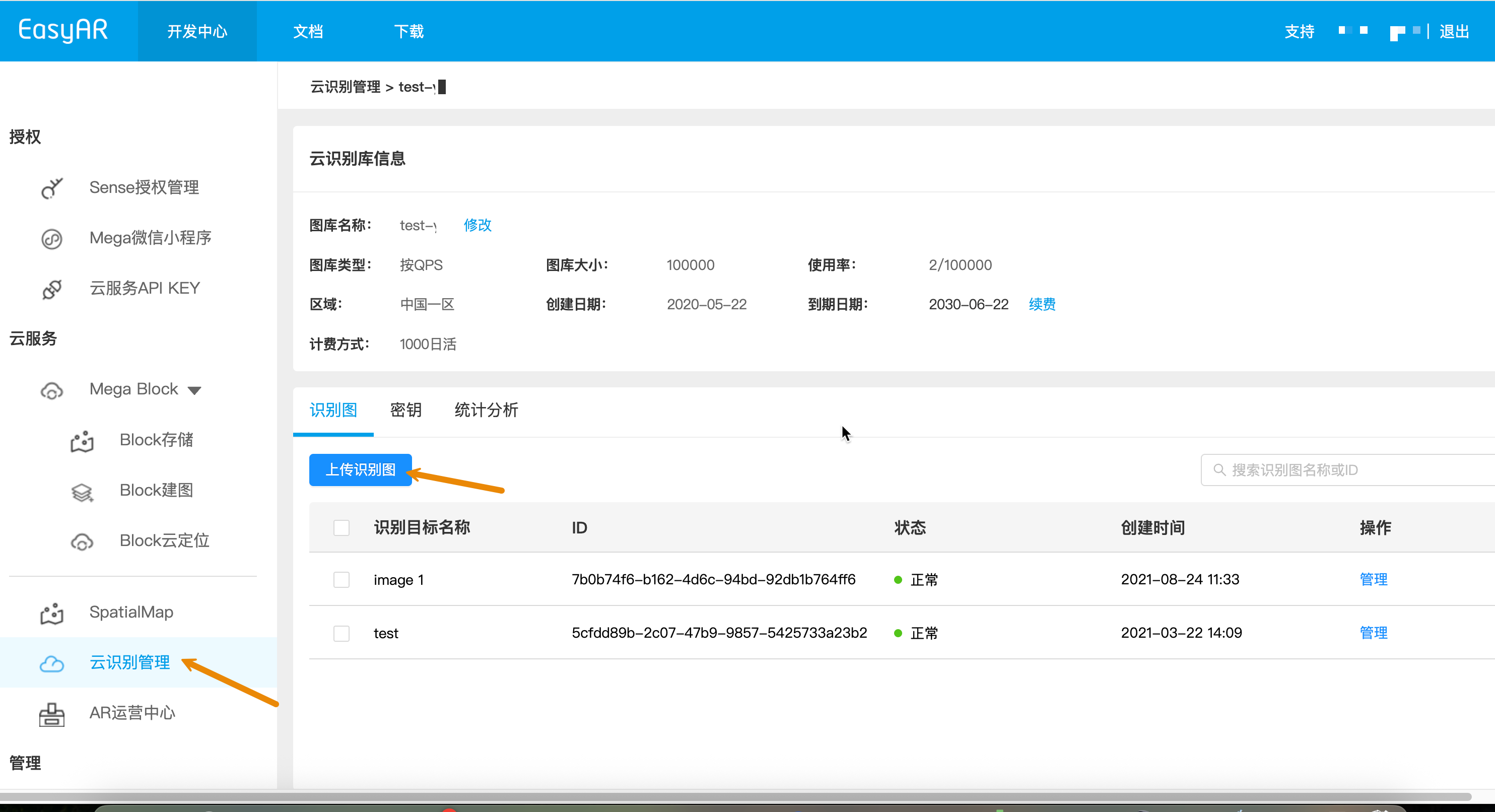
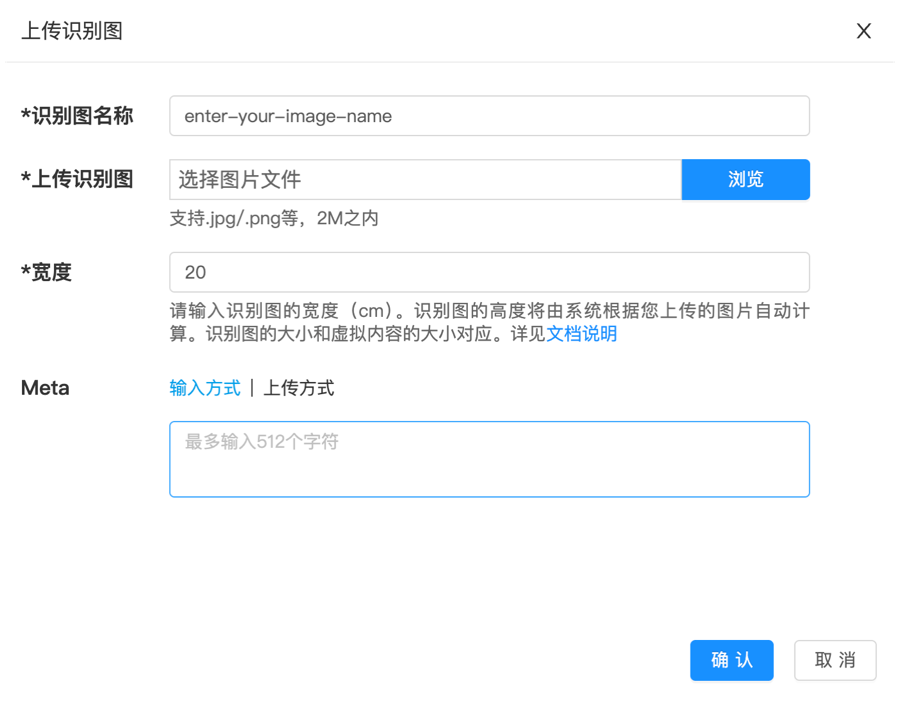
검증 단계 또는 소량의 대상 이미지를 유지 관리하는 데 적합합니다. Web 관리 console은 "force create" 모드를 사용하며, similarity check를 자동으로 수행하지 않고 image의 recognizability도 확인하지 않습니다.
대규모 관리 또는 자체 backend 통합이 필요한 경우 Web Service REST API를 사용하여 자동으로 생성하십시오.
- 먼저 로컬 대상 이미지를 Base64(macOS / Linux)로 변환하고 결과를 image_base64.txt에 저장합니다.
base64 -i ./target.jpg | tr -d '\n' > image_base64.txt
- 자리 표시자를 실제 매개변수로 바꾸고 curl 스크립트를 실행합니다.
- Your-Server-side-URL -> 실제 API host
- Your-Token -> 실제 API Key Authorization Token
- Your-CRS-AppId -> 사용자의 appId
- demo_target -> 대상 이름
- size -> 대상 이미지 너비(cm)
curl -X POST "https://<Your-Server-side-URL>/targets" \
  -H "Content-Type: application/json" \
  -H "Authorization: <YOUR-TOKEN>" \
  -d '{
    "appId": "<Your-CRS-AppId>",
    "image": "'"$(cat image_base64.txt)"'",
    "active": "1",
    "name": "demo_target",
    "size": "20",
    "type": "ImageTarget",
    "allowSimilar": "1"
  }'
Java sample code 다운로드
Maven 방식으로 project 가져오기
Step 1. 관련 코드 파일 CreateTarget.java를 엽니다
Step 2. 전역 변수를 수정하고 준비 checklist의 인증 parameter로 교체합니다
- CRS AppId
- API Key / API Secret
- Server-end URL
- IMAGE_PATH: 업로드할 target image 파일
public class CreateTarget {

    private static final String TARGET_MGMT_URL = "http://cn1.crs.easyar.com:8888";
    private static final String CRS_APPID       = "--here is your CRS AppId--";
    private static final String API_KEY         = "--here is your API Key--";
    private static final String API_SECRET      = "--here is your API Secret--";
    private static final String IMAGE_PATH      = "test_target_image.jpg";

    public String create(Auth auth, String imgPath) throws IOException{
        byte[] image = Files.readAllBytes(Paths.get(imgPath));
        if(image.length > Common.MAXIMUM_SIZE) {
            System.err.println("maximum image size is 2MB");
            System.exit(-1);
        }
        JSONObject params = new JSONObject()
                .put("name", "java-sdk-test")
                .put("image", Base64.getEncoder().encodeToString(image))
                .put("type","ImageTarget")
                .put("size", "20")
                .put("meta", "Your customized meta info");
        RequestBody requestBody = FormBody.create(MediaType.parse("application/json; charset=utf-8"),
                Auth.signParam(params, auth.getAppId(), auth.getApiKey(), auth.getApiSecret()).toString());
        Request request = new Request.Builder()
                .url(auth.getCloudURL() + "/targets")
                .post(requestBody)
                .build();
        return new OkHttpClient.Builder().readTimeout(120,TimeUnit.SECONDS).build().newCall(request).execute().body().string();
    }

    public static void main(String[] args) throws IOException {
        Auth accessInfo  =  new Auth(CRS_APPID, API_KEY, API_SECRET, TARGET_MGMT_URL);
        JSONObject createResponse = new JSONObject(new CreateTarget().create(accessInfo, IMAGE_PATH)).getJSONObject(Common.KEY_RESULT);
        System.out.println("created target: "+ createResponse.getString(Common.KEY_TARGETID));
    }
}
Step 3. Main 실행
NodeJS sample code를 다운로드합니다.
Step 1. 키 파일 keys.json을 구성합니다.
- CRS AppId
- API Key / API Secret
{
  "appId": "--here is your appId for CRS App Instance for SDK 4--",
  "apiKey": "--here is your api key which is create from website and which has crs permission--",
  "apiSecret": "--here is your api secret which is create from website--"
}
Step 2. 테스트 이미지, 키 파일, Server-end URL을 지정하여 실행합니다.
node bin/addTarget test.jpeg -t <Server-end-URL> -c keys.json
[선택 사항] target image 매개변수 코드
target image를 추가하는 로직은 코드 파일 addTarget.js를 수정합니다.
meta, target image 이름 등 target image 매개변수를 편집합니다. 이는 createTarget 메서드에 전달되는 익명 target 구조에 해당합니다.
var argv = require('yargs')
    .usage('Usage: $0 [image] -t [host] -c [keys]')
    .demand(1)
    .default('t', 'http://localhost:8888').alias('t', 'host')
    .default('c', 'keys.json').alias('c', 'keys')
    .help('h').alias('h', 'help')
    .epilog('copyright 2015, sightp.com')
    .argv;

var fs = require('fs');

var imageFn = argv._[0];
var host = argv.host;
var keys = JSON.parse(fs.readFileSync(argv.keys));

var farmer = require('../farmer')(host, keys.appKey, keys.appSecret);

farmer.createTarget({
    'image': fs.readFileSync(imageFn).toString('base64'),
    'name':'test2',
    'allowSimilar': '1',
    'active':'1',
    'size':'20',
    'type':'imageTarget'
})
.then(function(resp) {
    console.log(resp.result.targetId);
})
.fail(function(err) {
    console.log(err);
});
createTarget은 클라우드 서비스 API를 호출합니다. sample code는 farmer.js에 있습니다.
function createTarget(target) {
    return Q.promise(function(resolve, reject) {
        request.post(host + '/targets')
        .send(signParams(target))
        .end(done(resolve, reject));
    });
}
관련 코드 파일 create_target.py를 만들고 전역 변수를 수정한 다음 실행합니다
pip install requests
python create_target.py
import base64, hashlib, json, time, requests

APP_ID = "your_app_id"
API_KEY = "your_api_key"
API_SECRET = "your_api_secret"
IMAGE_PATH = "test.jpg"
API_HOST = "https://cn1-crs.easyar.com"

def sha256_hex(s: str) -> str:
    return hashlib.sha256(s.encode()).hexdigest()

image_b64 = base64.b64encode(open(IMAGE_PATH, "rb").read()).decode()
timestamp = int(time.time() * 1000)

sign_params = {
    "image": image_b64,
    "name": "demo_target",
    "size": "20",
    "meta": "",
    "type": "ImageTarget",
    "timestamp": timestamp,
    "appId": APP_ID,
    "apiKey": API_KEY
}

sign_str = "".join(f"{k}{sign_params[k]}" for k in sorted(sign_params)) + API_SECRET
print(sign_str)
signature = sha256_hex(sign_str)

body = dict(sign_params)
body["signature"] = signature

headers = {
    "Content-Type": "application/json",
    "appId": APP_ID
}

resp = requests.post(f"{API_HOST}/targets", headers=headers, json=body)
print(resp.text)
PHP 샘플 코드를 다운로드합니다
Step 1. 진입 코드 demo.php를 엽니다
Step 2. 전역 변수를 수정하고 준비한 목록의 인증 매개변수로 바꿉니다
- CRS AppId
- API Key / API Secret
- Server-end URL
- imageFilePath : 업로드할 대상 이미지 파일 경로
<?php
include 'EasyARClientSdkCRS.php';
$apiKey = 'API Key';
$apiSecret = 'API Secret';
$crsAppId = 'CRS AppId'
$crsCloudUrl = 'https://cn1-crs.easyar.com';
$imageFilePath = '1.jpg'

$sdk = new EasyARClientSdkCRS($apiKey, $apiSecret, $crsAppId, $crsCloudUrl);

$params = [
  'name' => 'image 1',
  'active' => '1',
  'size' => '1',
  'meta' => base64_encode('hello world'),
  'image' => base64_encode(file_get_contents($imageFilePath)),
];

$rs = $sdk->targetAdd($params);
if ($rs->statusCode == 0) {
  print_r($rs->result);
} else {
  print_r($rs);
}
Step 3. php demo.php를 실행합니다
Cargo.toml:
[dependencies]
reqwest = { version = "0.11", features = ["json"] }
serde_json = "1"
sha2 = "0.10"
base64 = "0.21"
tokio = { version = "1", features = ["full"] }
main.rs:
use std::{fs, collections::BTreeMap};
use sha2::{Sha256, Digest};
use base64::Engine;
use reqwest::Client;
use std::time::{SystemTime, UNIX_EPOCH};

const APP_ID: &str = "your_app_id";
const API_KEY: &str = "your_api_key";
const API_SECRET: &str = "your_api_secret";
const IMAGE_PATH: &str = "test.jpg";
const API_HOST: &str = "https://cn1-crs.easyar.com";

fn sha256_hex(s: &str) -> String {
    let mut h = Sha256::new();
    h.update(s.as_bytes());
    format!("{:x}", h.finalize())
}

#[tokio::main]
async fn main() {
    let img = fs::read(IMAGE_PATH).unwrap();
    let image_b64 = base64::engine::general_purpose::STANDARD.encode(img);
    let timestamp = SystemTime::now()
        .duration_since(UNIX_EPOCH).unwrap()
        .as_millis();

    let mut sign = BTreeMap::new();
    sign.insert("image", image_b64);
    sign.insert("name", "demo_target".into());
    sign.insert("size", "20".into());
    sign.insert("meta", "".into());
    sign.insert("type", "ImageTarget".into());
    sign.insert("timestamp", timestamp.to_string());
    sign.insert("appId", APP_ID.into());
    sign.insert("apiKey", API_KEY.into());

    let mut raw = String::new();
    for (k, v) in &sign {
        raw.push_str(&format!("{}{}", k, v));
    }
    raw.push_str(API_SECRET);

    sign.insert("active", "1".into());
    sign.insert("signature", sha256_hex(&raw));

    let client = Client::new();
    let resp = client.post(format!("{}/targets", API_HOST))
        .header("Content-Type", "application/json")
        .header("appId", APP_ID)
        .json(&sign)
        .send().await.unwrap()
        .text().await.unwrap();

    println!("{}", resp);
}
cargo run
관련 코드 파일 main.go를 만들고 전역 변수를 수정한 다음 실행합니다.
go run main.go
main.go:
package main

import (
  "bytes"
  "crypto/sha256"
  "encoding/base64"
  "encoding/json"
  "fmt"
  "os"
  "sort"
  "net/http"
  "time"
)

const (
  AppID     = "your_app_id"
  ApiKey    = "your_api_key"
  ApiSecret = "your_api_secret"
  ImagePath = "test.jpg"
  ApiHost   = "https://cn1-crs.easyar.com"
)

func sha256Hex(s string) string {
  sum := sha256.Sum256([]byte(s))
  return fmt.Sprintf("%x", sum)
}

func main() {
  img, _ := os.ReadFile(ImagePath)
  imageB64 := base64.StdEncoding.EncodeToString(img)
  timestamp := time.Now().UnixMilli()

  sign := map[string]string{
    "image":     imageB64,
    "name":      "demo_target",
    "size":      "20",
    "meta":      "",
    "type":      "ImageTarget",
    "timestamp": fmt.Sprint(timestamp),
    "appId":     AppID,
    "apiKey":    ApiKey,
  }

  keys := make([]string, 0, len(sign))
  for k := range sign { keys = append(keys, k) }
  sort.Strings(keys)

  builder := ""
  for _, k := range keys {
    builder += k + sign[k]
  }
  builder += ApiSecret

  signature := sha256Hex(builder)
  sign["signature"] = signature

  body, _ := json.Marshal(sign)

  req, _ := http.NewRequest("POST", ApiHost+"/targets", bytes.NewReader(body))
  req.Header.Set("Content-Type", "application/json")

  resp, _ := http.DefaultClient.Do(req)
  defer resp.Body.Close()

  buf := new(bytes.Buffer)
  buf.ReadFrom(resp.Body)
  fmt.Println(buf.String())
}
.NET 콘솔 프로젝트를 만듭니다.
dotnet new console
dotnet run
using System;
using System.IO;
using System.Net.Http;
using System.Security.Cryptography;
using System.Text;
using System.Text.Json;
using System.Collections.Generic;
using System.Linq;

class Program
{
    const string APP_ID = "your_app_id";
    const string API_KEY = "your_api_key";
    const string API_SECRET = "your_api_secret";
    const string IMAGE_PATH = "test.jpg";
    const string API_HOST = "https://cn1-crs.easyar.com";

    static string Sha256(string s)
    {
        return Convert.ToHexString(
            SHA256.HashData(Encoding.UTF8.GetBytes(s))
        ).ToLower();
    }

    static void Main()
    {
        var imageB64 = Convert.ToBase64String(File.ReadAllBytes(IMAGE_PATH));
        var timestamp = DateTimeOffset.UtcNow.ToUnixTimeMilliseconds();

        var sign = new SortedDictionary<string, string> {
            ["image"] = imageB64,
            ["name"] = "demo_target",
            ["size"] = "20",
            ["type"] = "ImageTarget",
            ["timestamp"] = timestamp.ToString(),
            ["appId"] = APP_ID,
            ["apiKey"] = API_KEY
        };

        var builder = string.Concat(sign.Select(p => p.Key + p.Value)) + API_SECRET;
        sign["signature"] = Sha256(builder);

        var json = JsonSerializer.Serialize(sign);
        var client = new HttpClient();

        var resp = client.PostAsync(
            API_HOST + "/targets",
            new StringContent(json, Encoding.UTF8, "application/json")
        ).Result;

        Console.WriteLine(resp.Content.ReadAsStringAsync().Result);
    }
}
- 실행 환경
- Unity 2020 LTS 이상
- Scripting Backend: Mono 또는 IL2CPP 모두 가능
- API Compatibility Level: .NET Standard 2.1(권장)
Step 1: 이미지 파일 준비
Assets/
└── StreamingAssets/
|    └── target.jpg
└── Scripts/
     └── CreateImageTarget.cs
- Assets 디렉터리 이름에 따라
- CreateImageTarget.cs 스크립트를 만들고 아래 예제 코드를 복사합니다
- 이미지 target 테스트 이미지를 준비합니다
using System;
using System.IO;
using System.Text;
using UnityEngine;
using UnityEngine.Networking;
using System.Collections;

public class CreateImageTarget : MonoBehaviour
{
    [Header("Config")]
    public string apiUrl = "https://Your-Server-end-URL" + "/targets";
    public string authorizationToken = "YOUR API KEY AUTH TOKEN";
    public string imageFilePath = "target.jpg";   // StreamingAssets
    public string crsAppId = "<Your-CRS-AppId>";

    private void Start()
    {
        StartCoroutine(CreateTarget());
    }

    private IEnumerator CreateTarget()
    {
        // Read image file(Unity StreamingAssets)
        string fullPath = Path.Combine(Application.streamingAssetsPath, imageFilePath);

        if (!File.Exists(fullPath))
        {
            Debug.LogError($"Image file not found: {fullPath}");
            yield break;
        }

        byte[] imageBytes = File.ReadAllBytes(fullPath);
        string imageBase64 = Convert.ToBase64String(imageBytes);

        TargetRequestBody body = new TargetRequestBody
        {
            appId = crsAppId,
            image = imageBase64,
            active = "1",
            name = "unity_target",
            size = "20",
            meta = "created from unity",
            type = "ImageTarget",
            allowSimilar = "1"
        };

        string json = JsonUtility.ToJson(body);

        // UnityWebRequest
        UnityWebRequest request = new UnityWebRequest(apiUrl, "POST");
        byte[] jsonBytes = Encoding.UTF8.GetBytes(json);

        request.uploadHandler = new UploadHandlerRaw(jsonBytes);
        request.downloadHandler = new DownloadHandlerBuffer();
        request.SetRequestHeader("Content-Type", "application/json");
        request.SetRequestHeader("Authorization", authorizationToken);

        yield return request.SendWebRequest();

        if (request.result == UnityWebRequest.Result.Success)
        {
            Debug.Log("Create target success:");
            Debug.Log(request.downloadHandler.text);
        }
        else
        {
            Debug.LogError("Create target failed:");
            Debug.LogError(request.error);
            Debug.LogError(request.downloadHandler.text);
        }
    }

    [Serializable]
    private class TargetRequestBody
    {
        public string appId;
        public string image;
        public string active;
        public string name;
        public string size;
        public string meta;
        public string type;
        public string allowSimilar;
    }
}
- Unity Editor에서:
- 빈 GameObject 생성
- TargetUploader로 이름 지정
- CreateImageTarget 스크립트를 이 객체로 드래그
Step 3: 파라미터 구성(Inspector)
Step 4: 실행
- Play 클릭
- Console에서 결과 확인:
- 성공: JSON 반환(targetId 포함)
- 실패: HTTP / 오류 정보