Exemplo de migração da versão 4.6 para a versão 4000: migrar o sample SpatialMap_Sparse_Localizing
Este artigo descreve como migrar o sample SpatialMap_Sparse_Localizing do EasyAR Sense Unity Plugin versão 4.6 para a versão 4000.
Substituir o pacote plugin
Consulte o guia geral de migração para substituir o pacote plugin.
Reconstruir a scene (obrigatório)
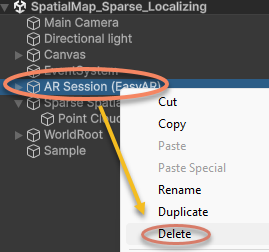
Exclua AR Session da scene:
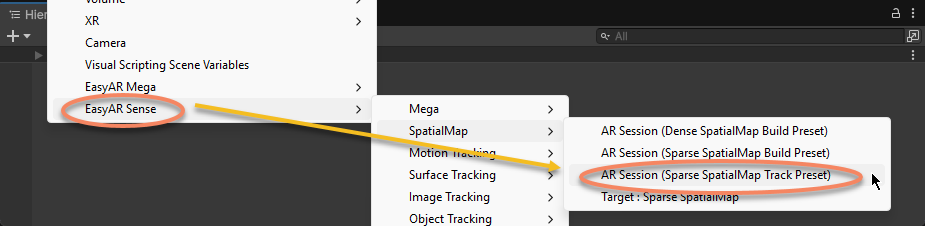
Recrie AR Session:
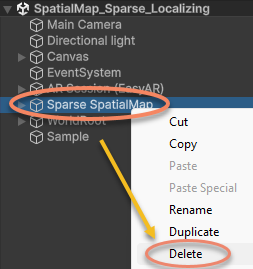
Exclua Sparse SpatialMap da scene:
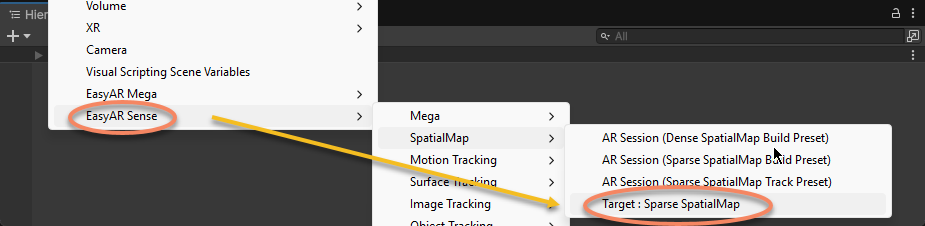
Recrie Sparse SpatialMap:
Na janela Inspector do componente Sparse SpatialMap Controller, insira o ID e Name do sparse spatial map e especifique o Tracker:
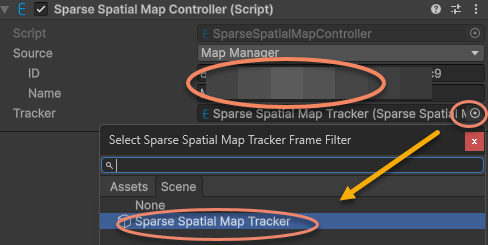
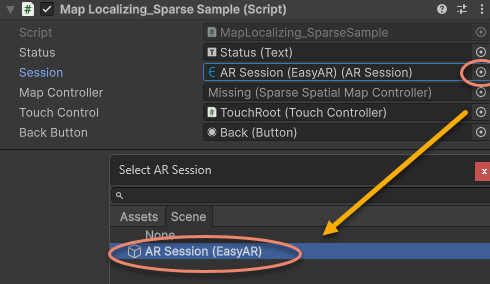
Reatribua ARSession no script do sample para a AR Session (EasyAR) recém-criada:
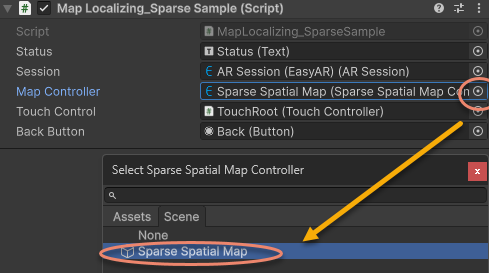
Reatribua MapController no script do sample para o Sparse SpatialMap Controller recém-criado:
Modificar código incompatível
Remova o código que imprime Status em Start e atualize os callbacks de localization do sparse spatial map para MapController.TargetFound e MapController.TargetLost de acordo com a API da nova versão:
Código da versão anterior:
sparse = Session.GetComponentInChildren<SparseSpatialMapWorkerFrameFilter>();

if (string.IsNullOrEmpty(MapController.MapManagerSource.ID) || string.IsNullOrEmpty(MapController.MapManagerSource.Name))
{
    throw new UIPopupException("Map ID or Name NOT set, please set MapManagerSource on: " + MapController + Environment.NewLine +
        "To create SpatialMap, use <SpatialMap_SparseSpatialMap> sample." + Environment.NewLine +
        "To get Map ID and Name, use EasyAR Develop Center (www.easyar.com) -> SpatialMap -> Database Details." + Environment.NewLine +
        "Map ID is used when loading, it can be used to share maps among devices.", 100);
}

MapController.MapLoad += (map, status, error) =>
{
    GUIPopup.EnqueueMessage("Load map {name = " + map.Name + ", id = " + map.ID + "} into " + sparse.name + Environment.NewLine +
        " => " + status + (string.IsNullOrEmpty(error) ? "" : " <" + error + ">"), status ? 3 : 5);

    if (!status)
    {
        return;
    }

    GUIPopup.EnqueueMessage("Notice: load map (only the first time each map) will trigger a download in this sample." + Environment.NewLine +
        "Statistical request count will be increased (more details on EasyAR website)." + Environment.NewLine +
        "Map cache is used after a successful download." + Environment.NewLine +
        "Map cache will be cleared if SparseSpatialMapManager.clear is called or app uninstalled.", 5);
};

MapController.MapLocalized += () =>
{
    GUIPopup.EnqueueMessage("Localized map {name = " + MapController.MapInfo.Name + "}", 3);
};

MapController.MapStopLocalize += () =>
{
    GUIPopup.EnqueueMessage("Stopped localize map {name = " + MapController.MapInfo.Name + "}", 3);
};

sparse.Localizer.startLocalization();
Alterar para:
sparse = Session.GetComponentInChildren<SparseSpatialMapWorkerFrameFilter>();

MapController.TargetFound += () =>
{
    Debug.Log($"Found target {{name = {MapController.Info.Name}}}");
};

MapController.TargetLost += () =>
{
    if (!MapController) { return; }
    Debug.Log($"Lost target {{name = {MapController.Info.Name}}}");
};
Use a nova API em Update para determinar se o sparse spatial map existe e está sendo rastreado diretamente:
Código da versão original:
private void Update()
{
    Status.text = $"Device Model: {SystemInfo.deviceModel} {deviceModel}" + Environment.NewLine +
        "VIO Device" + Environment.NewLine +
        "\tType: " + ((Session.Assembly != null && Session.Assembly.FrameSource) ? Session.Assembly.FrameSource.GetType().ToString().Replace("easyar.", "").Replace("FrameSource", "") : "-") + Environment.NewLine +
        "\tTracking Status: " + Session.TrackingStatus + Environment.NewLine +
        "Sparse Spatial Map" + Environment.NewLine +
        "\tWorking Mode: " + sparse.WorkingMode + Environment.NewLine +
        "\tLocalization Mode: " + sparse.LocalizerConfig.LocalizationMode + Environment.NewLine +
        "Localized Map" + Environment.NewLine +
        "\tName: " + (sparse.LocalizedMap == null ? "-" : (sparse.LocalizedMap.MapInfo == null ? "-" : sparse.LocalizedMap.MapInfo.Name)) + Environment.NewLine +
        "\tID: " + (sparse.LocalizedMap == null ? "-" : (sparse.LocalizedMap.MapInfo == null ? "-" : sparse.LocalizedMap.MapInfo.ID)) + Environment.NewLine +
        "\tPoint Cloud Count: " + (sparse.LocalizedMap == null ? "-" : sparse.LocalizedMap.PointCloud.Count.ToString()) + Environment.NewLine +
        "Cube Location: " + (onSparse ? "On Sparse Spatial Map" : (Session.TrackingStatus.OnSome && Session.TrackingStatus != MotionTrackingStatus.NotTracking ? "Air" : "-")) + Environment.NewLine +
        Environment.NewLine +
        "Gesture Instruction" + Environment.NewLine +
        "\tMove to Sparse Spatial Map Point: One Finger Move" + Environment.NewLine +
        "\tScale: Two Finger Pinch";

    if (Input.touchCount == 1 && !EventSystem.current.IsPointerOverGameObject(Input.GetTouch(0).fingerId))
    {
        var touch = Input.touches[0];
        if (touch.phase == TouchPhase.Moved)
        {
            var viewPoint = new Vector2(touch.position.x / Screen.width, touch.position.y / Screen.height);
            if (sparse && sparse.LocalizedMap)
            {
                var points = sparse.LocalizedMap.HitTest(viewPoint);
                foreach (var point in points)
                {
                    onSparse = true;
                    TouchControl.transform.position = sparse.LocalizedMap.transform.TransformPoint(point);
                    break;
                }
            }
        }
    }
}
Alterar para:
private void Update()
{
    if (Input.touchCount == 1 && !EventSystem.current.IsPointerOverGameObject(Input.GetTouch(0).fingerId))
    {
        var touch = Input.touches[0];
        if (touch.phase == TouchPhase.Moved)
        {
            var viewPoint = new Vector2(touch.position.x / Screen.width, touch.position.y / Screen.height);
            if (MapController && MapController.IsDirectlyTracked)
            {
                var points = MapController.HitTest(viewPoint);
                foreach (var point in points)
                {
                    onSparse = true;
                    TouchControl.transform.position = MapController.transform.TransformPoint(point);
                    break;
                }
            }
        }
    }
}
Neste ponto, a scene e os scripts do sample foram atualizados para a versão 4000.0 e podem ser executados.