Table of Contents

MegaTrackerFrameFilter 组件參考

切換到 API

探索 MegaTrackerFrameFilter 組件視窗中的各項屬性以自訂相機參數。

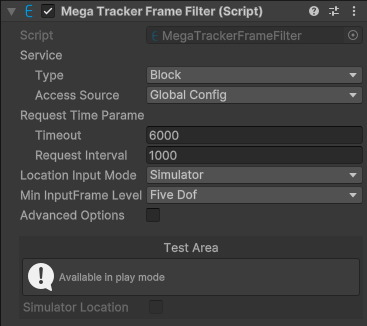
alt text

預設條件下組件截圖。

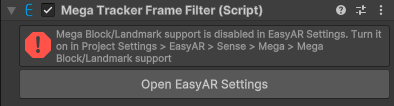
alt text

未匯入 com.easyar.mega 套件,組件不可用時的截圖。

MegaTrackerFrameFilter 組件視窗由兩個部分組成:組件配置和測試區域。

組件配置

屬性 描述
Service 服務存取資訊。
        Type EasyAR Mega 服務類型。選項:
  • Block:Mega Block。
  • Landmark:Mega Landmark。
        Access Source 服務存取資料來源類型。選項:
                App ID Access Source 是 API Key 或 Token 時顯示。
服務AppID。
                Server Address Access Source 是 API Key 或 Token 時顯示。
服務位址。
                API Key Access Source 是 API Key 時顯示。
API Key。
                API Secret Access Source 是 API Key 時顯示。
API Secret。
                Token Access Source 是 Token 時顯示。
Token。
Request Time Parameters 請求時間參數。
        Timeout 與伺服器通訊的超時時間(毫秒)。
        Request Interval 期望的請求間隔時間(毫秒),值越大整體誤差越大。
Location Input Mode 位置輸入模式。選項:
  • Onsite:在現場使用的情況的輸入模式。GNSS 資料通常從裝置獲取並輸入到 Mega,通常由 MegaTrackerFrameFilter 內部處理。
  • Simulator:遠端偵錯或電腦上執行必須使用的輸入模式,GNSS 資料需要模擬成現場資料並透過對應介面輸入 Mega。可選。
  • FramePlayer:在使用 FramePlayer 時的輸入模式。這個模式是唯讀的。
遠端偵錯或電腦上執行必須設定成 Simulator 模式,否則將無法使用。現場使用要設定成 Onsite 以達到最佳效果。
Min Input Frame Level 輸入幀最小允許的 MegaInputFrameLevel。如果 frame source 只能給出維度更低的 CameraTransformType 的資料,session 會啟動失敗。選項:
  • ZeroDof:0DoF。
  • ThreeDof:3DoF。
  • FiveDof:5DoF。
  • SixDof:6DoF。

測試區域

測試功能在 Unity play 模式下可用。

服務類型是 Block 時,測試區域顯示 Block 測試功能:

alt text

可以模擬 GNSS 資料進行測試。

服務類型是 Landmark 時,測試區域顯示 Landmark 測試功能:

alt text

可以模擬 GNSS 資料進行測試。

可以模擬 MegaLandmarkFilterWrapper.FilterBySpotId(string, Action<MegaLandmarkFilterResponse>)MegaLandmarkFilterWrapper.FilterByLocation(Action<MegaLandmarkFilterResponse>) 執行。